
Facebook's privacy policy, like its services, is an evolving organism. Recently, that evolution has been reactive rather than pro-active. Another reaction may be in the works after today's announcement of a new Facebook feature that enables users to subscribe to personal interests or "likes," officially called "Connections," the way they connect to other users.
The company said today there's a new way for a Facebook user to block others, including friends, from seeing one's "connections" -- the list of pages that represent things one likes to do (e.g., snowboarding) or to partake in (e.g., classical music), or people they may enjoy who may not be represented by their own Facebook pages (e.g., Bertrand Russell, Elvis Presley). But someone who's perusing the page for people or things that Facebook users vote that they "Like" (which replaces "Become a Fan Of" today) may still see the list of everyone who has voted she likes something, the company also said -- indicating that one's likes may never be completely private.

"Within your Privacy Settings under the Account menu, you have a section called 'Friends, Tags and Connections.' Adjusting the drop-down menus beside each field let you determine who can see those parts of your profile," reads a post on Facebook's blog this morning from software engineer Alex Li. "These visibility settings are a direct response to your requests to be able to hide more information on your profile. Specifically, the most requested feature a few weeks ago was to enable you to hide your friend list on your profile from your friends. As part of today's changes, you can do that."
As of today, Facebook's Help Center still explains that folks who are on your friends list will be able to read the contents of the friends list. That explanation will likely change as this addition to the system filters through to users.
However, a user may find he can be discovered after all, by someone who notices his name attached to the "Connection" page for the thing he likes.
As Li (who "likes" Roger Federer, but is now "connected" to Johannes Brahms) explained, "Keep in mind that Facebook Pages you connect to are public. You can control which friends are able to see connections listed on your profile, but you may still show up on Pages you're connected to. If you don't want to show up on those Pages, simply disconnect from them by clicking the 'Unlike' link in the bottom left column of the Page. You always decide what connections to make."
Community pages are the destination points for connections, or likes (the terminology here could perhaps be streamlined just a bit). Based on the prototype picture supplied by Facebook, they appear to be crosses between the typical Facebook fan page and a Wikipedia entry. Current Facebook users may have already begun to see messages from the service asking them whether they'd like to connect to certain existing Community pages gleaned from the likes and affiliations already on their profiles, including their hometowns, their alma maters, and their bio entries. In any event, the message from Facebook's Li made clear, if you don't want people discovering you like something or someone...you can just stop liking her.
"Profiles no longer are a static list of likes and interests," writes Li. "Now, they are a living map of all the connections that matter to you."
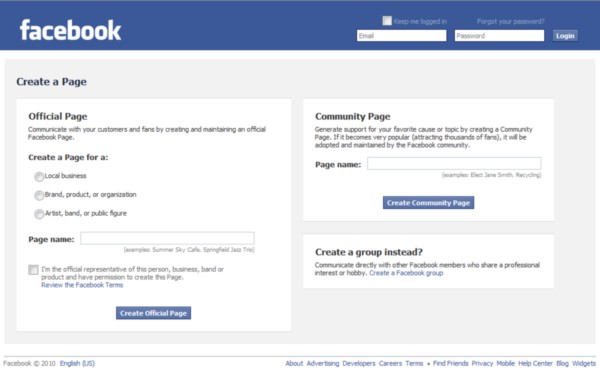
Just exactly how community pages...get there, and what happens to them after they're there, may be a bit up in the air, even after Facebook's explanation. As the official invitation page for creating an "Official Page" or a "Community Page" or a "Group" suggests, someone creating an Official Page needs to be a representative of the subject at hand -- for example, he needs to not be a fan of Roger Federer, but to be Roger Federer, or his authorized agent. A Facebook group (something which the service has had for years) continues to be an access point for multiple folks engaged in the same hobby or interest.
But a Community Page is supposed to be an entity in itself -- something which a person can plant on his own, which can sprout forth through nurturing from whoever passes by, and can eventually be adopted by someone else entirely. "Generate support for your favorite cause or topic by creating a Community Page," the invitation reads. "If it becomes very popular (attracting thousands of fans), it will be adopted and maintained by the Facebook community."
Facebook's own developers -- who happen to be meeting next Wednesday at the f8 developers' conference in San Francisco -- aren't having much more luck than we are discerning the distinction here. A developer with the Facebook app builder Inside Network, who goes by the handle s2facebook, asked the company earlier this month and got a response...but he says it wasn't much of one.
"Facebook hasn't explained clearly what it means when it says 'adopted and maintained by the Facebook community.' When we asked, Facebook only told us that 'if, over time, it gains a large fan base, it will be adopted by the community and it will not have one specific owner,'" s2facebook wrote.
Having more hands-on knowledge of how Facebook apps operate, s2facebook came to this conclusion: While a "Group" maintains its own privacy settings, and may thus be protected from complete public exposure, a "Page" is designed to present some level of public information. "Group owners can't message members if it has more than 5,000 people; Pages provide more customizable options, designed for marketers; Pages include the Insights analytics tool; because Pages are public, information in them appears in search results," the developer wrote. "Community Pages are another way, then, that Facebook can get more content in search engines while maintaining its goals for Official Pages."
Anticipating today's initial rollout of Connections/"Likes"/Community Pages, the Financial Times ran a story this morning that said Facebook was using this new system to assemble a behavioral advertising platform. This way, the story (in its original form) said, Facebook would be able to gather more discrete data about its users to help advertisers better target services to them.
SEE VIDEO:
The FT later revised (extensively) that story; and a Facebook spokesperson told Betanews this afternoon that the original form of that story was incorrect. However, the spokesperson's explanation was noteworthy not for saying that Facebook isn't building such a system, but rather that no such system was being announced today.
"The Financial Times story incorrectly suggested that Facebook is launching behavioral ad targeting at f8, their upcoming developer conference," the spokesperson told Betanews. "The FT story has been corrected. As Facebook has said previously, they are moving from 'Become a Fan' to 'Like' to make the language on the site more consistent, but they have no announcements or changes planned to their ad offering or ad policies."
While the data being gathered through the creation of Community pages may not be expressly assembled for marketing purposes, it appears the ability to do so remains feasible -- something which an enterprising developer may discover as soon as Wednesday.
RELATED POST:
0 comments:
Post a Comment