• Facebook Help Center
Showing posts with label Unblock Someone. Show all posts

Unblock Someone on Messenger

 Facebook Unblock, Unblock Someone     No comments   

Unblock Someone on Messenger: People block others on Facebook for a list of reasons. But if you discover they have become less annoying, you may want to unblock them. If you have no idea on how to unblock someone on Facebook, then we have designed this article for you, it's going to take you through steps to unblock someone on both the Facebook mobile app and on the Facebook website. 


How to unblock on Facebook

Part 1:How to unblock someone on an iOS/Android device.

Step 1. Open Facebook on your iOS / Android device.

Step 2. Tap , scroll down and tap Settings. Select Account Settings.
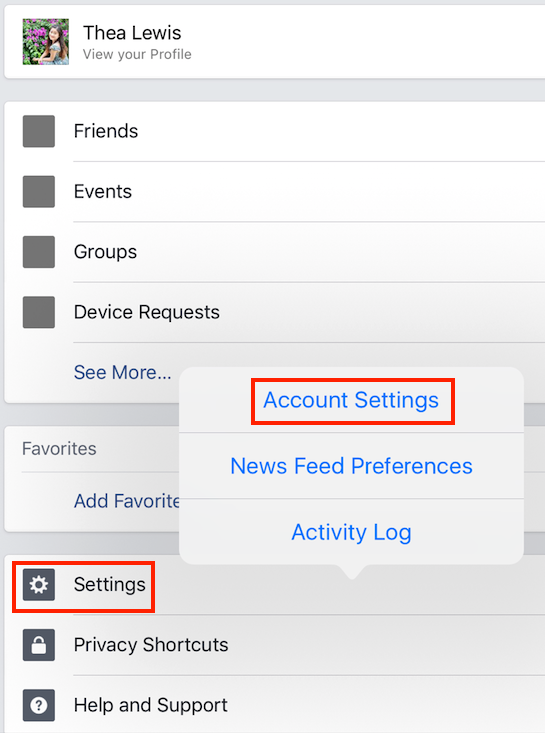


Step 3. Tap on Blocking.
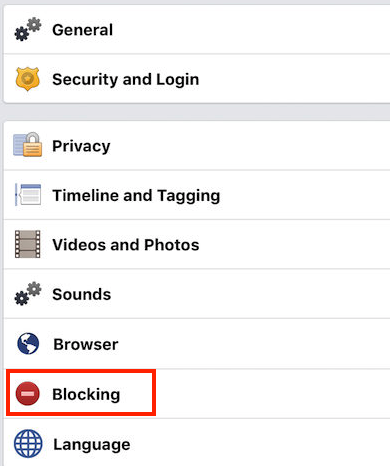


Step 4. Then on this page, you’ll see a list of people that you’ve blocked in the past. Select the one you want to unblock, tap on Unblock and confirm. That’s it!

Part 2. How to Unblock Someone on Facebook on Computer

Step 1. Go to www.facebook.com, and sign in your account.

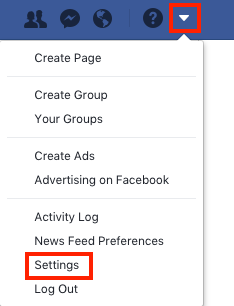
Step 2. Click drop down arrow in the top-right side of the Facebook window, and click Settings.

Step 3. Click on Blocking, you’ll see the name of each person that you’ve blocked in Block users section. Select the one you want to unblock and click Unblock button.
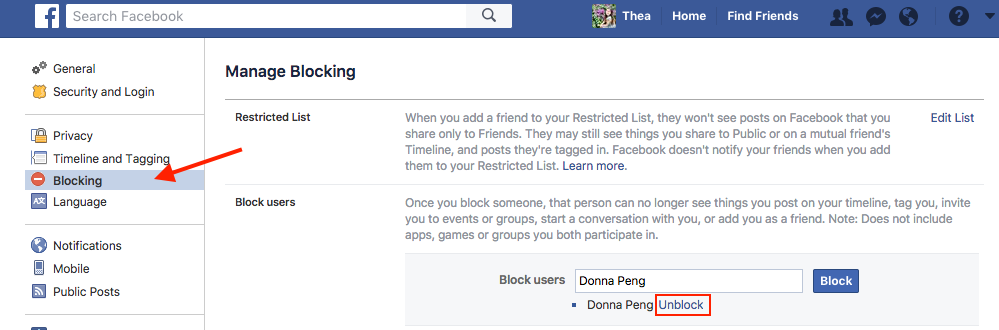

Step 4. Confirm your operation.
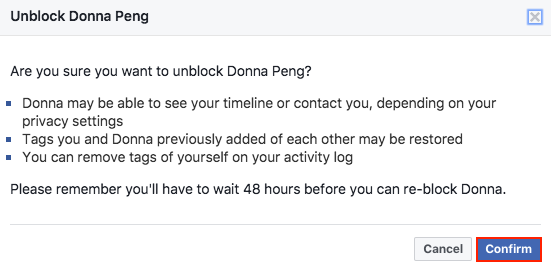

If you unblock a person, you can re-block him/her after 48 hours.

The steps listed above will help you unblock someone.

Read More
  • Share This:  
  •  Facebook
  •  Twitter
  •  Google+
  •  Stumble
  •  Digg

How To See/View Your Blocked List On Facebook - Unblock Friends

 Block Facebook Friend, Blocked List, facebook block list, Unblock, Unblock Someone     1 comment   

Do you want to see your blocked list on FB so you can decide whether to unblock them or not? Unblocking friends is a great way to give them a second chance to see if they have truly changed.

We live in a world where forgiveness has come to become an important part of our lifestyle. If you fail to display this nature, you'll not be fair when the real story is told in your absence. 

The best way to handle annoying friends whom you have blocked on Facebook and are willing to repent is to honor their wish and unblock them as they demand. 

So, what if you really really want to unblock them but you don't know how to do the unblocking process on Facebook? well, the good news is that this post is actually aimed at helping you out.


How To See/View Your Blocked List On Facebook - Unblock Friends


How To See Your Blocked List On Facebook


When you unblock someone, that person will be able to see your posts on Facebook that you share with the public. The person won't automatically become your friend on Facebook. If you want to become friends with a person who you've unblocked, you'll need to send them a friend request again.
To unblock someone:
  • Click in the top right of any Facebook page
  • Click Privacy Shortcuts
  • Click How do I stop someone from bothering me?
  • Click View All Blocked Users.
  • Click Unblock next to the name of the person you want to unblock.
Recommended:

How To See My Blocked List On Facebook

How you can unblock Facebook friends


Please share this article with other friends on Facebook. Thank You!
Read More
  • Share This:  
  •  Facebook
  •  Twitter
  •  Google+
  •  Stumble
  •  Digg

How to Unblock Someone on Facebook | Unblocking Facebook Friends

 Unblock Someone     No comments   

How to Unblock Someone on Facebook | Unblocking Facebook Friends? This guide will help you to unblock anyone you desire to unblock from your blocked list. First and foremost, you will need to login to your account and access your blocked list. See: How to Log out of My Facebook Account?

How Can I Unblock Someone on Facebook

To unblock someone you blocked, you should login to your Facebook account.
At the top right of your account, you'll find the the question sign (Quick Help).


How to Unblock Someone on Facebook | Unblocking Facebook Friends


Next, go to Privacy Shortcuts


Tap on how do I stop someone from bothering me?


Click on View all Blocked users.


Locate the person you wish to unblock and tap on unblock by the side - next to the persons name.

See:
  • How To View Your Blocked List On Facebook
  • How to create an Event on Facebook


How to Unblock a Facebook User on Android Device


Click on More Button >> Account Settings >> Blocking >> Tap on Blocked User.

That's all.


Please share this article with your friends!
Read More
  • Share This:  
  •  Facebook
  •  Twitter
  •  Google+
  •  Stumble
  •  Digg

Can I unblock a blocked Facebook User?

 Block, Unblock Someone     No comments   

Can I unblock a blocked Facebook User?: Unblocking and blocking someone on Facebook are interesting Facebook features that allows you to stop someone from bothering you on Facebook and as well unblock them whenever you feel like. If you are using Facebook Android app to access Facebook, the option to unblock someone is also there for users. How To View Your Blocked List On Facebook.

If you want to know whether you can unblock someone on Facebook, then the answer is a capital yes but how do you block someone on Facebook?
This Facebook guide will help you!!!


When you unblock someone, that person will be able to see your posts on Facebook that you share with the public. The person won't automatically become your friend on Facebook. If you want to become friends with a person who you've unblocked, you'll need to send them a friend request.

How To Unblock Someone On Facebook Android App


How To Unblock Someone On Facebook Android App
To unblock someone using Android App:

  • Tap on this icon
  • Scroll to the bottom and tap Account Settings > Blocking
  • To unblock someone, tap Unblock next to their name.

See: How To View Your Blocked List On Facebook

Were you able to unblock user? Share your thoughts!

This article first appeared on this page: How To Unblock Friends And People On Facebook
Read More
  • Share This:  
  •  Facebook
  •  Twitter
  •  Google+
  •  Stumble
  •  Digg

How To Unblock Someone On Facebook Android App

 Facebook App, Facebook Mobile, Mobile App, Unblock, Unblock Someone     No comments   

If you are using Facebook Android app to access Facebook, the option to unblock someone is also there for users. How To View Your Blocked List On Facebook.

When you unblock someone, that person will be able to see your posts on Facebook that you share with the public. The person won't automatically become your friend on Facebook. If you want to become friends with a person who you've unblocked, you'll need to send them a friend request.

How To Unblock Someone On Facebook Android App


How To Unblock Someone On Facebook Android App
To unblock someone using Android App:

  • Tap on this icon
  • Scroll to the bottom and tap Account Settings > Blocking
  • To unblock someone, tap Unblock next to their name.

See: How To View Your Blocked List On Facebook


Were you able to unblock your friend? Share your thoughts bellow!
Read More
  • Share This:  
  •  Facebook
  •  Twitter
  •  Google+
  •  Stumble
  •  Digg

How To See/View Your Blocked List On Facebook - Unblock Friends

 Block Facebook Friend, Blocked List, facebook block list, Unblock, Unblock Someone     1 comment   

Do you want to see your blocked list on FB so you can decide whether to unblock them or not? Unblocking friends is a great way to give them a second chance to see if they have truly changed.

We live in a world where forgiveness has come to become an important part of our lifestyle. If you fail to display this nature, you'll not be fair when the real story is told in your absence. 

The best way to handle annoying friends whom you have blocked on Facebook and are willing to repent is to honor their wish and unblock them as they demand. 

So, what if you really really want to unblock them but you don't know how to do the unblocking process on Facebook? well, the good news is that this post is actually aimed at helping you out.


How To See/View Your Blocked List On Facebook - Unblock Friends


How To See Your Blocked List On Facebook


When you unblock someone, that person will be able to see your posts on Facebook that you share with the public. The person won't automatically become your friend on Facebook. If you want to become friends with a person who you've unblocked, you'll need to send them a friend request again.
To unblock someone:
  • Click in the top right of any Facebook page
  • Click Privacy Shortcuts
  • Click How do I stop someone from bothering me?
  • Click View All Blocked Users.
  • Click Unblock next to the name of the person you want to unblock.
Recommended:

How To See My Blocked List On Facebook

How you can unblock Facebook friends


Please share this article with other friends on Facebook. Thank You!
Read More
  • Share This:  
  •  Facebook
  •  Twitter
  •  Google+
  •  Stumble
  •  Digg

Checkout how to unblock a friend on Facebook

 Block, Unblock Someone     1 comment   

Checkout how to unblock a friend on Facebook in this latest Facebook tutorial. Learn how to unblock your true friend and add them back to your friends list to keep the fire really  burning among you guys.

There is nothing I cherished so much like settling long standing differences. So if you are ready to unblock a blocked friend, this post will be of utmost importance to you.


Checkout how to unblock a friend on Facebook


If you are using Facebook Android app to access Facebook, the option to unblock someone is also there for users. How To View Your Blocked List On Facebook.

When you unblock someone, that person will be able to see your posts on Facebook that you share with the public. The person won't automatically become your friend on Facebook. If you want to become friends with a person who you've unblocked, you'll need to send them a friend request.

How To Unblock Someone On Facebook Android App


How To Unblock Someone On Facebook Android App
To unblock someone using Android App:

  • Tap on this icon
  • Scroll to the bottom and tap Account Settings > Blocking
  • To unblock someone, tap Unblock next to their name.

See: How To View Your Blocked List On Facebook


Were you able to unblock user? Share your thoughts and share this article. Thanks
Read More
  • Share This:  
  •  Facebook
  •  Twitter
  •  Google+
  •  Stumble
  •  Digg

How to unblock someone on Facebook that has blocked you - Messenger!

 Messenger, Unblock, Unblock Someone     1 comment   

How you can easily unblock someone on Facebook that has blocked you tutorial - First and foremost, the possibility of unblocking someone is not there since you did not blocked the person in the first place. But if you did blocked the person, you can unblock them.

In a situation where you were blocked by this person, you cannot unblock them unless they choose to unblock you at their will.

However, there are some recommendations below to help you unlock someone as well as how to go about unblocking yourself if you are blocked.

How to unblock someone on Facebook that has blocked you


When you unblock someone, that person will be able to see your posts on Facebook that you share with the public. The person won't automatically become your friend on Facebook. If you want to become friends with a person who you've unblocked, you'll need to send them a friend request

Smart: How to delete multiple photo album on Facebook

To unblock someone:

  • Click in the top right of any Facebook page
  • Click Privacy Shortcuts
  • Click How do I stop someone from bothering me?
  • Click View All Blocked Users.
  • Click Unblock next to the name of the person you want to unblock.

Ultimate way to unblock someone on Facebook on iPhone Mobile


You can simply unblock a friend by using this direct Facebook link to unblock them instead of following the procedures outlined above.


This second method is the sure way of unblocking anybody that were blocked by you.

Click on this link: https://web.facebook.com/settings?tab=blocking

Note: If you were blocked by another person from viewing their pictures or accessing their profile, you cannot unblock yourself except he or she unblocks you.

Best way is to call them and ask them to unblock you. If you are honest with them, they will unblock you. Cheers!


I hope you were able to unblock your friends through the help of this Facebook support guide. Please help us to share it with your friends and family on Facebook so they can also benefit. Thank you!
Read More
  • Share This:  
  •  Facebook
  •  Twitter
  •  Google+
  •  Stumble
  •  Digg

How I Unblocked a Blocked Facebook Friends Step by Step

 Unblock, Unblock Someone     1 comment   

How I Unblocked a Blocked Facebook Friends Step by Step: Do you want to find out how I unblocked a Facebook friend who kept on bothering me? In this article, you'll find out how to unblock your Facebook friends in less than no time and at the same time see how to block those who are pissing you off on FB


Unblocking Facebook friends is the best way to get your blocked friends to chat and comment and like your Facebook updates, it’s one of the tricks you can get to play around with on Facebook to get the best out of Facebook.


How I Unblocked a Blocked Facebook Friends Step by Step


When you Unblock someone on Facebook, they will be able to see your post shared with Public. One thing with unblocking is that after you’ve unblocked someone, The person is not automatically added to your friends list once again. So, in order to become friends with the person you unblocked, you will have to send them a friends Request Again.


Facebook is fun with more unblocked friends so lets get started to unblock your friends so you can also fit in to this whole fun thing.

If you ever decide to block them again, then, you will have to wait for 48 hours again before you can proceed.

In the article, we also explain how to block anyone bothering you on Facebook.

Let's see how you or anyone can block someone who was initially in the blocked list!!!

How to Unblock A Blocked Facebook User On Android Phone


When you unblock someone, that person will be able to see your posts on Facebook that you share with the public. The person won't automatically become your friend on Facebook. If you want to become friends with a person who you've unblocked, you'll need to send them a friend request.


Smart Read:

  • Learn How to Delete Your Facebook Account in less than 5 mins
  • How to Turn off Facebook Location


How To unblock someone Through Your PC

  • Click in the top right of any Facebook page
  • Click Privacy Shortcuts
  • Click How do I stop someone from bothering me?
  • Click View All Blocked Users.
  • Click Unblock next to the name of the person you want to unblock.

What is blocking and how do I block annoying Facebook Friend?

When you block a Facebook friend or an external stalker they will no longer be able to do things such as tag you or see things you post on your Timeline. If you're friends, blocking them will also unfriend them.

How to block friends or people who are bothering you on Facebook

  1. Click at the top right of any Facebook page.
  2. Click Privacy Shortcuts
  3. Click How do I stop someone from bothering me?
  4. Enter the name of the person you want to block and click Block
  5. Select the specific person you want to block from the list that appears and click Block again
Note that Facebook friends will not be notified when you block them.
If you can't find someone using this method, try going to the person's profile and selecting Block from the menu on their cover photo.


Please share this post with your friends and family on Facebook so they will also learn what you've learnt. Sharing is caring - Don't be a Shellfish 😅😅😅!!! 


For more adorable Facebook tips visit Learn Facebook Basics and become a pro Facebook user.
Read More
  • Share This:  
  •  Facebook
  •  Twitter
  •  Google+
  •  Stumble
  •  Digg

How I Unblocked a Blocked Facebook Friends Step by Step

 Unblock, Unblock Someone     1 comment   

How I Unblocked a Blocked Facebook Friends Step by Step: Do you want to find out how I unblocked a Facebook friend who kept on bothering me? In this article, you'll find out how to unblock your Facebook friends in less than no time and at the same time see how to block those who are pissing you off on FB


Unblocking Facebook friends is the best way to get your blocked friends to chat and comment and like your Facebook updates, it’s one of the tricks you can get to play around with on Facebook to get the best out of Facebook.


How I Unblocked a Blocked Facebook Friends Step by Step


When you Unblock someone on Facebook, they will be able to see your post shared with Public. One thing with unblocking is that after you’ve unblocked someone, The person is not automatically added to your friends list once again. So, in order to become friends with the person you unblocked, you will have to send them a friends Request Again.


Facebook is fun with more unblocked friends so lets get started to unblock your friends so you can also fit in to this whole fun thing.

If you ever decide to block them again, then, you will have to wait for 48 hours again before you can proceed.

In the article, we also explain how to block anyone bothering you on Facebook.

Let's see how you or anyone can block someone who was initially in the blocked list!!!

How to Unblock A Blocked Facebook User On Android Phone


When you unblock someone, that person will be able to see your posts on Facebook that you share with the public. The person won't automatically become your friend on Facebook. If you want to become friends with a person who you've unblocked, you'll need to send them a friend request.


Smart Read:

  • Learn How to Delete Your Facebook Account in less than 5 mins
  • How to Turn off Facebook Location


How To unblock someone Through Your PC

  • Click in the top right of any Facebook page
  • Click Privacy Shortcuts
  • Click How do I stop someone from bothering me?
  • Click View All Blocked Users.
  • Click Unblock next to the name of the person you want to unblock.

What is blocking and how do I block annoying Facebook Friend?

When you block a Facebook friend or an external stalker they will no longer be able to do things such as tag you or see things you post on your Timeline. If you're friends, blocking them will also unfriend them.

How to block friends or people who are bothering you on Facebook

  1. Click at the top right of any Facebook page.
  2. Click Privacy Shortcuts
  3. Click How do I stop someone from bothering me?
  4. Enter the name of the person you want to block and click Block
  5. Select the specific person you want to block from the list that appears and click Block again
Note that Facebook friends will not be notified when you block them.
If you can't find someone using this method, try going to the person's profile and selecting Block from the menu on their cover photo.


Please share this post with your friends and family on Facebook so they will also learn what you've learnt. Sharing is caring - Don't be a Shellfish 😅😅😅!!! 


For more adorable Facebook tips visit Learn Facebook Basics and become a pro Facebook user.
Read More
  • Share This:  
  •  Facebook
  •  Twitter
  •  Google+
  •  Stumble
  •  Digg

Checkout how to unblock a friend on Facebook

 Block, Unblock Someone     1 comment   

Checkout how to unblock a friend on Facebook in this latest Facebook tutorial. Learn how to unblock your true friend and add them back to your friends list to keep the fire really  burning among you guys.

There is nothing I cherished so much like settling long standing differences. So if you are ready to unblock a blocked friend, this post will be of utmost importance to you.


Checkout how to unblock a friend on Facebook


If you are using Facebook Android app to access Facebook, the option to unblock someone is also there for users. How To View Your Blocked List On Facebook.

When you unblock someone, that person will be able to see your posts on Facebook that you share with the public. The person won't automatically become your friend on Facebook. If you want to become friends with a person who you've unblocked, you'll need to send them a friend request.

How To Unblock Someone On Facebook Android App


How To Unblock Someone On Facebook Android App
To unblock someone using Android App:

  • Tap on this icon
  • Scroll to the bottom and tap Account Settings > Blocking
  • To unblock someone, tap Unblock next to their name.

See: How To View Your Blocked List On Facebook


Were you able to unblock user? Share your thoughts and share this article. Thanks
Read More
  • Share This:  
  •  Facebook
  •  Twitter
  •  Google+
  •  Stumble
  •  Digg

How to unblock someone on Facebook that has blocked you - Messenger!

 Messenger, Unblock, Unblock Someone     1 comment   

How you can easily unblock someone on Facebook that has blocked you tutorial - First and foremost, the possibility of unblocking someone is not there since you did not blocked the person in the first place. But if you did blocked the person, you can unblock them.

In a situation where you were blocked by this person, you cannot unblock them unless they choose to unblock you at their will.

However, there are some recommendations below to help you unlock someone as well as how to go about unblocking yourself if you are blocked.

How to unblock someone on Facebook that has blocked you


When you unblock someone, that person will be able to see your posts on Facebook that you share with the public. The person won't automatically become your friend on Facebook. If you want to become friends with a person who you've unblocked, you'll need to send them a friend request

Smart: How to delete multiple photo album on Facebook

To unblock someone:

  • Click in the top right of any Facebook page
  • Click Privacy Shortcuts
  • Click How do I stop someone from bothering me?
  • Click View All Blocked Users.
  • Click Unblock next to the name of the person you want to unblock.

Ultimate way to unblock someone on Facebook on iPhone Mobile


You can simply unblock a friend by using this direct Facebook link to unblock them instead of following the procedures outlined above.


This second method is the sure way of unblocking anybody that were blocked by you.

Click on this link: https://web.facebook.com/settings?tab=blocking

Note: If you were blocked by another person from viewing their pictures or accessing their profile, you cannot unblock yourself except he or she unblocks you.

Best way is to call them and ask them to unblock you. If you are honest with them, they will unblock you. Cheers!


I hope you were able to unblock your friends through the help of this Facebook support guide. Please help us to share it with your friends and family on Facebook so they can also benefit. Thank you!
Read More
  • Share This:  
  •  Facebook
  •  Twitter
  •  Google+
  •  Stumble
  •  Digg

How To Unblock Someone On Facebook Android App

 Facebook App, Facebook Mobile, Mobile App, Unblock, Unblock Someone     No comments   

If you are using Facebook Android app to access Facebook, the option to unblock someone is also there for users. How To View Your Blocked List On Facebook.

When you unblock someone, that person will be able to see your posts on Facebook that you share with the public. The person won't automatically become your friend on Facebook. If you want to become friends with a person who you've unblocked, you'll need to send them a friend request.

How To Unblock Someone On Facebook Android App


How To Unblock Someone On Facebook Android App
To unblock someone using Android App:

  • Tap on this icon
  • Scroll to the bottom and tap Account Settings > Blocking
  • To unblock someone, tap Unblock next to their name.

See: How To View Your Blocked List On Facebook


Were you able to unblock your friend? Share your thoughts bellow!
Read More
  • Share This:  
  •  Facebook
  •  Twitter
  •  Google+
  •  Stumble
  •  Digg

Can I unblock a blocked Facebook User?

 Block, Unblock Someone     No comments   

Can I unblock a blocked Facebook User?: Unblocking and blocking someone on Facebook are interesting Facebook features that allows you to stop someone from bothering you on Facebook and as well unblock them whenever you feel like. If you are using Facebook Android app to access Facebook, the option to unblock someone is also there for users. How To View Your Blocked List On Facebook.

If you want to know whether you can unblock someone on Facebook, then the answer is a capital yes but how do you block someone on Facebook?
This Facebook guide will help you!!!


When you unblock someone, that person will be able to see your posts on Facebook that you share with the public. The person won't automatically become your friend on Facebook. If you want to become friends with a person who you've unblocked, you'll need to send them a friend request.

How To Unblock Someone On Facebook Android App


How To Unblock Someone On Facebook Android App
To unblock someone using Android App:

  • Tap on this icon
  • Scroll to the bottom and tap Account Settings > Blocking
  • To unblock someone, tap Unblock next to their name.

See: How To View Your Blocked List On Facebook

Were you able to unblock user? Share your thoughts!

This article first appeared on this page: How To Unblock Friends And People On Facebook
Read More
  • Share This:  
  •  Facebook
  •  Twitter
  •  Google+
  •  Stumble
  •  Digg

How To See/View Your Blocked List On Facebook - Unblock Friends

 Block Facebook Friend, Blocked List, facebook block list, Unblock, Unblock Someone     1 comment   

Do you want to see your blocked list on FB so you can decide whether to unblock them or not? Unblocking friends is a great way to give them a second chance to see if they have truly changed.

We live in a world where forgiveness has come to become an important part of our lifestyle. If you fail to display this nature, you'll not be fair when the real story is told in your absence. 

The best way to handle annoying friends whom you have blocked on Facebook and are willing to repent is to honor their wish and unblock them as they demand. 

So, what if you really really want to unblock them but you don't know how to do the unblocking process on Facebook? well, the good news is that this post is actually aimed at helping you out.


How To See/View Your Blocked List On Facebook - Unblock Friends


How To See Your Blocked List On Facebook


When you unblock someone, that person will be able to see your posts on Facebook that you share with the public. The person won't automatically become your friend on Facebook. If you want to become friends with a person who you've unblocked, you'll need to send them a friend request again.
To unblock someone:
  • Click in the top right of any Facebook page
  • Click Privacy Shortcuts
  • Click How do I stop someone from bothering me?
  • Click View All Blocked Users.
  • Click Unblock next to the name of the person you want to unblock.
Recommended:

How To See My Blocked List On Facebook

How you can unblock Facebook friends


Please share this article with other friends on Facebook. Thank You!
Read More
  • Share This:  
  •  Facebook
  •  Twitter
  •  Google+
  •  Stumble
  •  Digg

How to Unblock Someone on Facebook | Unblocking Facebook Friends

 Unblock Someone     No comments   

How to Unblock Someone on Facebook | Unblocking Facebook Friends? This guide will help you to unblock anyone you desire to unblock from your blocked list. First and foremost, you will need to login to your account and access your blocked list. See: How to Log out of My Facebook Account?

How Can I Unblock Someone on Facebook

To unblock someone you blocked, you should login to your Facebook account.
At the top right of your account, you'll find the the question sign (Quick Help).


How to Unblock Someone on Facebook | Unblocking Facebook Friends


Next, go to Privacy Shortcuts


Tap on how do I stop someone from bothering me?


Click on View all Blocked users.


Locate the person you wish to unblock and tap on unblock by the side - next to the persons name.

See:
  • How To View Your Blocked List On Facebook
  • How to create an Event on Facebook


How to Unblock a Facebook User on Android Device


Click on More Button >> Account Settings >> Blocking >> Tap on Blocked User.

That's all.


Please share this article with your friends!
Read More
  • Share This:  
  •  Facebook
  •  Twitter
  •  Google+
  •  Stumble
  •  Digg

How I Unblocked a Blocked Facebook Friends Step by Step

 Unblock, Unblock Someone     1 comment   

How I Unblocked a Blocked Facebook Friends Step by Step: Do you want to find out how I unblocked a Facebook friend who kept on bothering me? In this article, you'll find out how to unblock your Facebook friends in less than no time and at the same time see how to block those who are pissing you off on FB


Unblocking Facebook friends is the best way to get your blocked friends to chat and comment and like your Facebook updates, it’s one of the tricks you can get to play around with on Facebook to get the best out of Facebook.


How I Unblocked a Blocked Facebook Friends Step by Step


When you Unblock someone on Facebook, they will be able to see your post shared with Public. One thing with unblocking is that after you’ve unblocked someone, The person is not automatically added to your friends list once again. So, in order to become friends with the person you unblocked, you will have to send them a friends Request Again.


Facebook is fun with more unblocked friends so lets get started to unblock your friends so you can also fit in to this whole fun thing.

If you ever decide to block them again, then, you will have to wait for 48 hours again before you can proceed.

In the article, we also explain how to block anyone bothering you on Facebook.

Let's see how you or anyone can block someone who was initially in the blocked list!!!

How to Unblock A Blocked Facebook User On Android Phone


When you unblock someone, that person will be able to see your posts on Facebook that you share with the public. The person won't automatically become your friend on Facebook. If you want to become friends with a person who you've unblocked, you'll need to send them a friend request.


Smart Read:

  • Learn How to Delete Your Facebook Account in less than 5 mins
  • How to Turn off Facebook Location


How To unblock someone Through Your PC

  • Click in the top right of any Facebook page
  • Click Privacy Shortcuts
  • Click How do I stop someone from bothering me?
  • Click View All Blocked Users.
  • Click Unblock next to the name of the person you want to unblock.

What is blocking and how do I block annoying Facebook Friend?

When you block a Facebook friend or an external stalker they will no longer be able to do things such as tag you or see things you post on your Timeline. If you're friends, blocking them will also unfriend them.

How to block friends or people who are bothering you on Facebook

  1. Click at the top right of any Facebook page.
  2. Click Privacy Shortcuts
  3. Click How do I stop someone from bothering me?
  4. Enter the name of the person you want to block and click Block
  5. Select the specific person you want to block from the list that appears and click Block again
Note that Facebook friends will not be notified when you block them.
If you can't find someone using this method, try going to the person's profile and selecting Block from the menu on their cover photo.


Please share this post with your friends and family on Facebook so they will also learn what you've learnt. Sharing is caring - Don't be a Shellfish 😅😅😅!!! 


For more adorable Facebook tips visit Learn Facebook Basics and become a pro Facebook user.
Read More
  • Share This:  
  •  Facebook
  •  Twitter
  •  Google+
  •  Stumble
  •  Digg
Older Posts Home

Blog Archive

  • ▼  2019 (30)
    • ▼  January (30)
      • Facebook Lite Download
      • How to Upload High Quality Photos to Instagram
      • Login Instagram Online
      • Who Viewed My Facebook Profile Recently 2019
      • Get Real Instagram Followers
      • Instagram Facebook Login
      • Who Visited My Facebook Profile How to Check
      • Temporarily Disable Facebook Account
      • Free Collage Maker for Facebook
      • How Do I Find My Videos On Facebook
      • People You May Know Facebook
      • How to Find someone On Facebook by Phone Number
      • How Do People Get Famous On Instagram In 2019
      • How to Change Date of Birth in Facebook
      • Posting Multiple Pictures On Facebook
      • How To Find Your Blocked Friends On Facebook
      • How to Get Unblocked On Facebook
      • Add Phone Number to Facebook Account
      • Deactivate Instagram Account Link
      • How We Close Facebook Account
      • How to remove fb temporarily or permanently
      • How to Unsend a Facebook Message | Facebook Messen...
      • How to deactivate your FB account in 10secs | Temp...
      • How can i cancel my Facebook account totally | Clo...
      • FACEBOOK MARKETPLACE BUY AND SELL SAFELY
      • How Do You Know Who Unfollowed You | How to Know W...
      • How To Change My Fb Account Name | Edit Your Faceb...
      • How To Use Facebook As My Business Page - Messenge...
      • How To Add My Phone Number To Facebook | Facebook ...
      • How To Delete A Post From Your Facebook Timeline |...
  • ►  2018 (8737)
    • ►  December (14)
    • ►  November (568)
    • ►  October (269)
    • ►  September (922)
    • ►  August (1873)
    • ►  July (266)
    • ►  June (192)
    • ►  May (1544)
    • ►  April (1335)
    • ►  March (1115)
    • ►  February (639)

Copyright © Facebook Help Center