• Facebook Help Center
Showing posts with label location. Show all posts

How to Show my Location on Facebook

 location     No comments   

Sharing your location in a Messenger conversation — either continuously for an hour with Live Location or as a static point — is completely optional. You are always in control. For additional information and instructions on sending or sharing a location in Messenger, please visit the Help Center.


How Do I Turn on Location Services for Facebook?
Location Services for Facebook is only available on a mobile Android or iOS device.
To turn on Location Services for Facebook, first turn on Location Services for your phone, and then location access for the Facebook app.
Android Devices
  • To turn on Location Services for your Android device:
  • Tap Settings > Security & location > Location.
  • Tap  to turn on Location Services.
  • In older Android devices (OS 5.1.1 and earlier), turning on Location Services automatically turns on location access for the Facebook app.
  • To turn on location access for the Facebook app for Android (OS 6.0+):
  • Tap Settings > Apps >  > App Permissions > Location.
  • Scroll through the list of apps and tap  near Facebook.
  • Restart the Facebook app for Android.

iOS Devices
  • To turn on Location Services for your iOS device:
  • Tap Settings > Privacy > Location Services.
  • Tap  near Location Services.
  • To turn on location access for the Facebook app for iOS (version 8.0+):
  • Go to your device's home screen.
  • Tap Settings > Privacy > Location Services.
  • Scroll through the list of apps below, tap Facebook and select While Using the App. If you previously turned on Location History for Facebook, you can select Always.
  • Restart the Facebook app for iPhone or iPad.

Sharing Your Location

You can add your location to a post to tell people you're at a specific place, like your home or a restaurant.
  • To add your location to a new post:
  • Begin writing your post.
  • Click  to add your location.
  • Click Post.
  • To add your location to an existing post:
  • Go to the post you'd like to add your location to.
  • Click  in the top right corner of the post.
  • Click Edit Post.
  • Click  to add your location.
  • Click Save.

Keep in mind that when you create a home location on Facebook, you can edit the name of your home, the photo and who’s allowed to see your home until someone other than you checks in at your home. Once someone else checks in, you won’t be able to edit the name of your home.

How can I send my current location in Messenger?
You can send your location in Messenger to let people know where you are. To send your location:
Open a conversation.
  • Tap  next to the text box. If you don't see that option, tap  then .
  • Tap Location.
  • Tap Share Live Location.
If you want to share a location other than where you are currently, you can pin the location.

Read More
  • Share This:  
  •  Facebook
  •  Twitter
  •  Google+
  •  Stumble
  •  Digg

How to Check Location on Facebook Messenger

 location     No comments   

Sharing your location in a Messenger conversation — either continuously for an hour with Live Location or as a static point — is completely optional. You are always in control. For additional information and instructions on sending or sharing a location in Messenger, please visit the Help Center.


How Do I Turn on Location Services for Facebook?
Location Services for Facebook is only available on a mobile Android or iOS device.
To turn on Location Services for Facebook, first turn on Location Services for your phone, and then location access for the Facebook app.
Android Devices
  • To turn on Location Services for your Android device:
  • Tap Settings > Security & location > Location.
  • Tap  to turn on Location Services.
  • In older Android devices (OS 5.1.1 and earlier), turning on Location Services automatically turns on location access for the Facebook app.
  • To turn on location access for the Facebook app for Android (OS 6.0+):
  • Tap Settings > Apps >  > App Permissions > Location.
  • Scroll through the list of apps and tap  near Facebook.
  • Restart the Facebook app for Android.

iOS Devices
  • To turn on Location Services for your iOS device:
  • Tap Settings > Privacy > Location Services.
  • Tap  near Location Services.
  • To turn on location access for the Facebook app for iOS (version 8.0+):
  • Go to your device's home screen.
  • Tap Settings > Privacy > Location Services.
  • Scroll through the list of apps below, tap Facebook and select While Using the App. If you previously turned on Location History for Facebook, you can select Always.
  • Restart the Facebook app for iPhone or iPad.

Sharing Your Location

You can add your location to a post to tell people you're at a specific place, like your home or a restaurant.
  • To add your location to a new post:
  • Begin writing your post.
  • Click  to add your location.
  • Click Post.
  • To add your location to an existing post:
  • Go to the post you'd like to add your location to.
  • Click  in the top right corner of the post.
  • Click Edit Post.
  • Click  to add your location.
  • Click Save.

Keep in mind that when you create a home location on Facebook, you can edit the name of your home, the photo and who’s allowed to see your home until someone other than you checks in at your home. Once someone else checks in, you won’t be able to edit the name of your home.

How can I send my current location in Messenger?
You can send your location in Messenger to let people know where you are. To send your location:
Open a conversation.
  • Tap  next to the text box. If you don't see that option, tap  then .
  • Tap Location.
  • Tap Share Live Location.
If you want to share a location other than where you are currently, you can pin the location.

Read More
  • Share This:  
  •  Facebook
  •  Twitter
  •  Google+
  •  Stumble
  •  Digg

How to Post your Location on Facebook

 location     No comments   

Sharing your location in a Messenger conversation — either continuously for an hour with Live Location or as a static point — is completely optional. You are always in control. For additional information and instructions on sending or sharing a location in Messenger, please visit the Help Center.


How Do I Turn on Location Services for Facebook?
Location Services for Facebook is only available on a mobile Android or iOS device.
To turn on Location Services for Facebook, first turn on Location Services for your phone, and then location access for the Facebook app.
Android Devices
  • To turn on Location Services for your Android device:
  • Tap Settings > Security & location > Location.
  • Tap to turn on Location Services.
  • In older Android devices (OS 5.1.1 and earlier), turning on Location Services automatically turns on location access for the Facebook app.
  • To turn on location access for the Facebook app for Android (OS 6.0+):
  • Tap Settings > Apps > > App Permissions > Location.
  • Scroll through the list of apps and tap near Facebook.
  • Restart the Facebook app for Android.

iOS Devices
  • To turn on Location Services for your iOS device:
  • Tap Settings > Privacy > Location Services.
  • Tap near Location Services.
  • To turn on location access for the Facebook app for iOS (version 8.0+):
  • Go to your device's home screen.
  • Tap Settings > Privacy > Location Services.
  • Scroll through the list of apps below, tap Facebook and select While Using the App. If you previously turned on Location History for Facebook, you can select Always.
  • Restart the Facebook app for iPhone or iPad.

Sharing Your Location

You can add your location to a post to tell people you're at a specific place, like your home or a restaurant.
  • To add your location to a new post:
  • Begin writing your post.
  • Click to add your location.
  • Click Post.
  • To add your location to an existing post:
  • Go to the post you'd like to add your location to.
  • Click in the top right corner of the post.
  • Click Edit Post.
  • Click to add your location.
  • Click Save.

Keep in mind that when you create a home location on Facebook, you can edit the name of your home, the photo and who’s allowed to see your home until someone other than you checks in at your home. Once someone else checks in, you won’t be able to edit the name of your home.

How can I send my current location in Messenger?
You can send your location in Messenger to let people know where you are. To send your location:
Open a conversation.
  • Tap next to the text box. If you don't see that option, tap then .
  • Tap Location.
  • Tap Share Live Location.
If you want to share a location other than where you are currently, you can pin the location.


Read More
  • Share This:  
  •  Facebook
  •  Twitter
  •  Google+
  •  Stumble
  •  Digg

How to Switch off Location in iPhone

 location     No comments   

Your iPhone will track and record places that you visit most often to provide better location-based data and suggestions across iOS 11. While these suggestions can be super helpful, you may not like the idea of your iPhone and iPad tracking the locations you frequent

If you value your privacy more than you do location-based data and suggestions, you can turn the feature off.


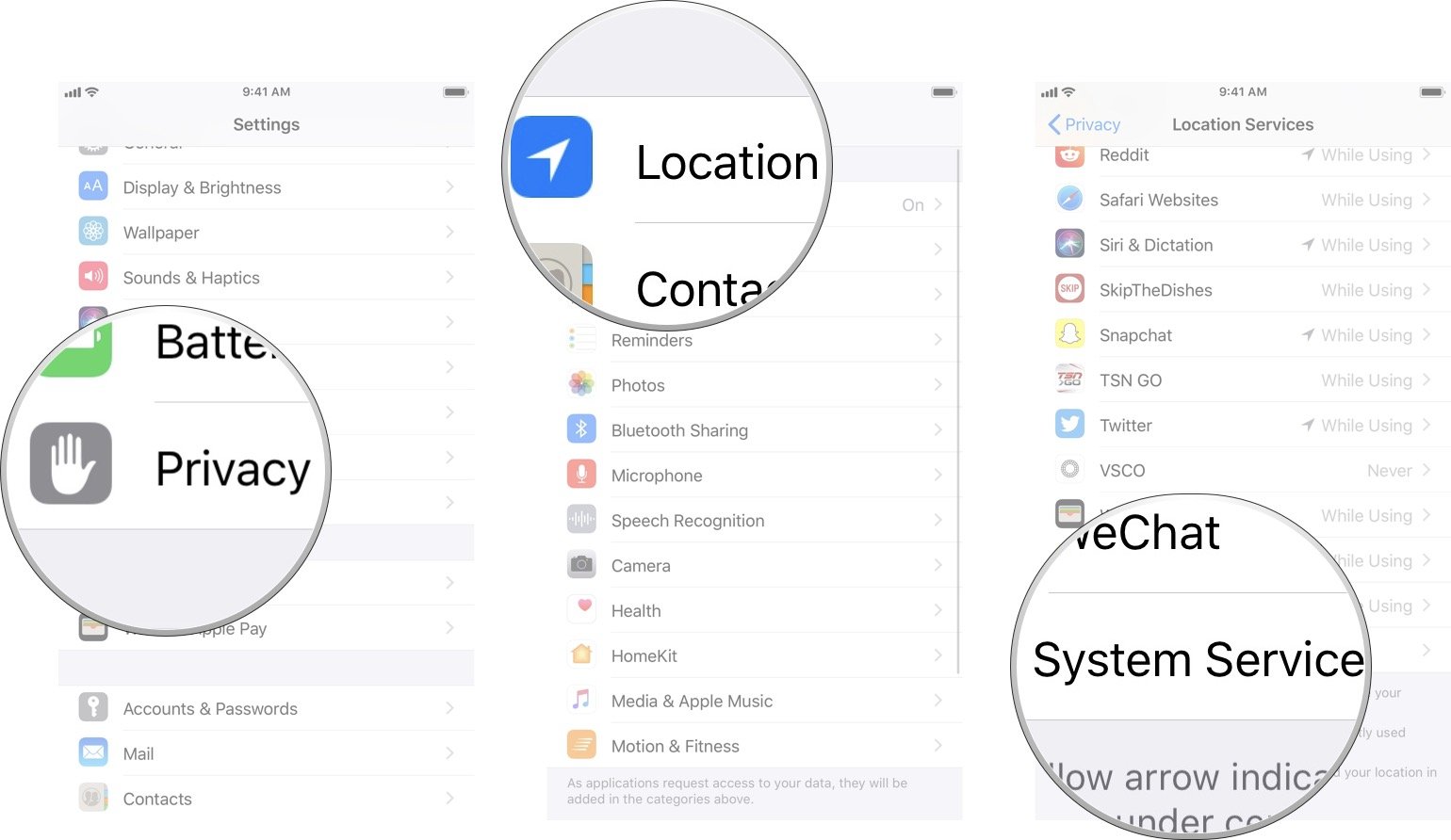
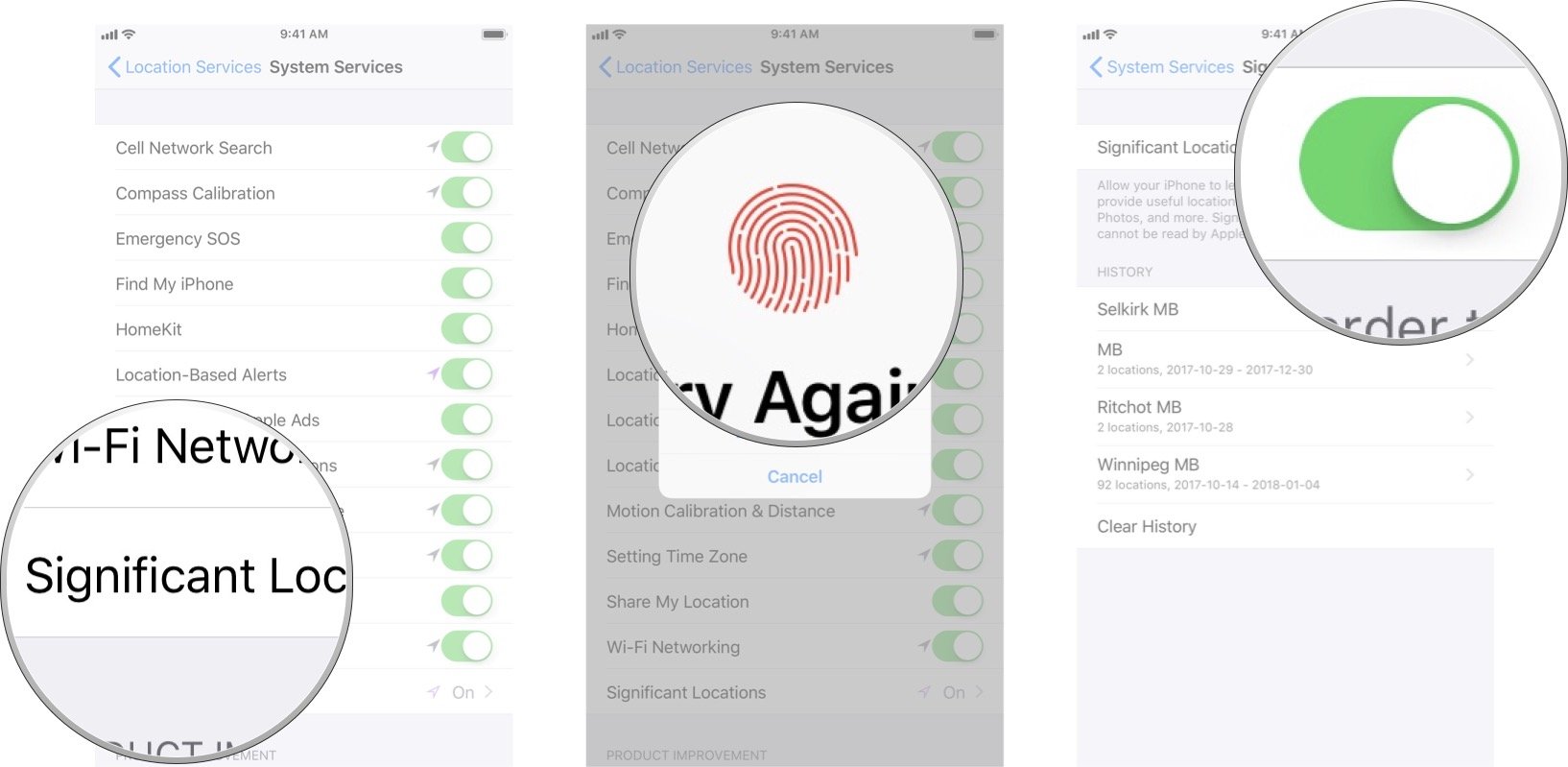
How to turn off Significant Locations on iPhone and iPad
  • Launch the Settings app from the Home screen.
  • Tap on Privacy.
  • Tap Location Services at the top.
  • Tap System Services. It's all the way down at the bottom of the list.


  • Tap Significant Locations.
  • Enter your passcode, use Touch ID, or Face ID, to authenticate access.
  • Tap the Significant Locations On/Off Switch. When the switch is gray, that means the feature has been turned off.

That's all there is to it. Locations you travel to most will no longer be tracked. While this comes at the expense of not having as accurate location data in places like the Today Summary screen, it also preserves your privacy better and to a lot of us, that's more important.

Read More
  • Share This:  
  •  Facebook
  •  Twitter
  •  Google+
  •  Stumble
  •  Digg

How to Find out Someones Location on Facebook Messenger

 location     No comments   

Sharing your location in a Messenger conversation — either continuously for an hour with Live Location or as a static point — is completely optional. You are always in control. For additional information and instructions on sending or sharing a location in Messenger, please visit the Help Center.


How Do I Turn on Location Services for Facebook?
Location Services for Facebook is only available on a mobile Android or iOS device.
To turn on Location Services for Facebook, first turn on Location Services for your phone, and then location access for the Facebook app.
Android Devices
  • To turn on Location Services for your Android device:
  • Tap Settings > Security & location > Location.
  • Tap  to turn on Location Services.
  • In older Android devices (OS 5.1.1 and earlier), turning on Location Services automatically turns on location access for the Facebook app.
  • To turn on location access for the Facebook app for Android (OS 6.0+):
  • Tap Settings > Apps >  > App Permissions > Location.
  • Scroll through the list of apps and tap  near Facebook.
  • Restart the Facebook app for Android.

iOS Devices
  • To turn on Location Services for your iOS device:
  • Tap Settings > Privacy > Location Services.
  • Tap  near Location Services.
  • To turn on location access for the Facebook app for iOS (version 8.0+):
  • Go to your device's home screen.
  • Tap Settings > Privacy > Location Services.
  • Scroll through the list of apps below, tap Facebook and select While Using the App. If you previously turned on Location History for Facebook, you can select Always.
  • Restart the Facebook app for iPhone or iPad.

Sharing Your Location

You can add your location to a post to tell people you're at a specific place, like your home or a restaurant.
  • To add your location to a new post:
  • Begin writing your post.
  • Click  to add your location.
  • Click Post.
  • To add your location to an existing post:
  • Go to the post you'd like to add your location to.
  • Click  in the top right corner of the post.
  • Click Edit Post.
  • Click  to add your location.
  • Click Save.

Keep in mind that when you create a home location on Facebook, you can edit the name of your home, the photo and who’s allowed to see your home until someone other than you checks in at your home. Once someone else checks in, you won’t be able to edit the name of your home.

How can I send my current location in Messenger?
You can send your location in Messenger to let people know where you are. To send your location:
Open a conversation.
  • Tap  next to the text box. If you don't see that option, tap  then .
  • Tap Location.
  • Tap Share Live Location.
If you want to share a location other than where you are currently, you can pin the location.

Read More
  • Share This:  
  •  Facebook
  •  Twitter
  •  Google+
  •  Stumble
  •  Digg
Older Posts Home

Blog Archive

  • ▼  2019 (30)
    • ▼  January (30)
      • Facebook Lite Download
      • How to Upload High Quality Photos to Instagram
      • Login Instagram Online
      • Who Viewed My Facebook Profile Recently 2019
      • Get Real Instagram Followers
      • Instagram Facebook Login
      • Who Visited My Facebook Profile How to Check
      • Temporarily Disable Facebook Account
      • Free Collage Maker for Facebook
      • How Do I Find My Videos On Facebook
      • People You May Know Facebook
      • How to Find someone On Facebook by Phone Number
      • How Do People Get Famous On Instagram In 2019
      • How to Change Date of Birth in Facebook
      • Posting Multiple Pictures On Facebook
      • How To Find Your Blocked Friends On Facebook
      • How to Get Unblocked On Facebook
      • Add Phone Number to Facebook Account
      • Deactivate Instagram Account Link
      • How We Close Facebook Account
      • How to remove fb temporarily or permanently
      • How to Unsend a Facebook Message | Facebook Messen...
      • How to deactivate your FB account in 10secs | Temp...
      • How can i cancel my Facebook account totally | Clo...
      • FACEBOOK MARKETPLACE BUY AND SELL SAFELY
      • How Do You Know Who Unfollowed You | How to Know W...
      • How To Change My Fb Account Name | Edit Your Faceb...
      • How To Use Facebook As My Business Page - Messenge...
      • How To Add My Phone Number To Facebook | Facebook ...
      • How To Delete A Post From Your Facebook Timeline |...
  • ►  2018 (8737)
    • ►  December (14)
    • ►  November (568)
    • ►  October (269)
    • ►  September (922)
    • ►  August (1873)
    • ►  July (266)
    • ►  June (192)
    • ►  May (1544)
    • ►  April (1335)
    • ►  March (1115)
    • ►  February (639)

Copyright © Facebook Help Center