• Facebook Help Center
Showing posts with label View Profile. Show all posts

How to See Who is Watching your Facebook Profile

 Facebook Profile, View Profile     No comments   

How to See Who is Watching your Facebook Profile: You may wonder who and who visits your profile, there is no sure  way to determine the identities of users who visit your profile, and any service or method that claims to do so is most likely inaccurate. It's also worth knowing that, due to the News Feed's algorithm, visiting people's profiles is less common than it used to be in the past. We would help you make calculated guesses on who your profile visitors are in this article.


How to Know Your Facebook Profile visitors

Method 1

Using Your Friends List
  • Log in to Facebook.
  • Click your name tab. It's in the upper-right corner of the Facebook page. This takes you to your Facebook profile page.On mobile, tap ☰ in the bottom-right corner of the screen (iPhone) or the top-right corner of the screen (Android).
  • Click Friends. This is found near the top of your profile page. It will bring up a list of your Facebook friends.On mobile, tap Friends in the menu.
  • Review the top results. The top 10 to 20 friends in this list are the people with whom you have the most frequent interactions, which means that they most likely visit your profile more often than other people.
  • Consider each of your top friends. Someone who has a few hundred friends is much more likely to view your profile than is someone who has a few thousand friends; this will help you narrow down the list of people who are likely to be viewing your page.If you see a person with whom you don't go out of your way to interact, they're probably viewing your page a fair amount.
  • Look through friend suggestions. If you receive a Facebook notification urging you to add certain people, the people in question are most likely friends of one (or more) of your most frequent profile visitors.
Method 2

Using a Status
  • Open Facebook, then Log in.
  • Select the status text box. Click or tap the text box near the top of the News Feed page. This text box usually has a phrase such as "What's on your mind?" in it.
  • Type in a neutral status. This might be a joke, a fact, or a general statement, but stay away from topics that will evoke strong emotions in your friend group.Avoid mentioning sensitive or partisan issues.Don't tag anyone in your status, as doing so will affect the results..
  • Click Post. It's in the bottom-right corner of the status window.On mobile, you'll tap Share in the upper-right corner instead.
  • Wait to see who likes the status. After a certain amount of time (e.g., 8 hours), review the status to see who liked it.If applicable, make a note of who commented on the status as well.
  • Repeat this test several more times. You'll want at least 5 different statuses to compare against each other.
  • Compare the mutual people who liked your statuses. If you noticed that a large number of the same people liked and/or commented on your Facebook statuses each time, its possible they are visiting your Facebook page more often than other people in your friends list.
Now you know who your Facebook profile visitors are, you may want to send a message to someone who constantly visits your page and likes your posts, it could be them showing interest you know.
Read More
  • Share This:  
  •  Facebook
  •  Twitter
  •  Google+
  •  Stumble
  •  Digg

How to See Who Views My Facebook Profile | Who is Looking at My Facebook Account?

 View Profile     No comments   

How to See Who Views My Facebook Profile | Who is Looking at My Facebook Account?: Most users are interested in seeing which Facebook friend or user is viewing their Facebook profile. While there are some programs and browser extension claiming that they can track who is stalking you on Facebook, there are some elements of scams in their activities.

Ensure that you don’t give any access to your account because it may compromise your Facebook privacy. View Facebook Blocked List

How to See Who Views My Facebook Profile | Who is Looking at My Facebook Account?


Unlike other social media, like LinkedIn, you can easily see who’s viewed your profile using the provided tool, but Facebook still not ready to show that feature, although many users wanted to have that.

Is there a way to find out who always viewing my Facebook profile?


While searching and finding a way to see who are checking Facebook profile or if it is possible, I came across in some popular way that are shared online.


Many videos with millions of views and popular pages, sharing the same instruction how to find out who is viewing your Facebook profile, they use InitialChatFriendsList.

This can be found when viewing the source code for your profile and the list of the numbers that follows is the list of ID’s that arranged from top which said the one who constantly viewing your profile.

I will tell you the truth this method is not exactly the list of people that are constantly viewing your profile, instead this is the list of friends that you have recently interacted with (in chat, message, comment thread).

Why I said this is not the list who recently check your profile? Because I tested it, I tell some of my friends to check my profile for some times and check if the list changed, it didn’t.
How to find InitialChatFriendsList

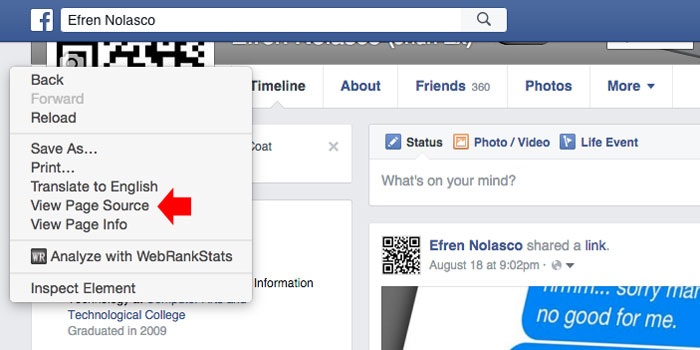
If you still wanted to check using the InitialChatFriendsList, I will share with you the steps. 1. On your Facebook Profile, perform right-click in the empty area on the side, then select “View Page Source”

See:

  • How you can change your Facebook password
  • How to delete Facebook post


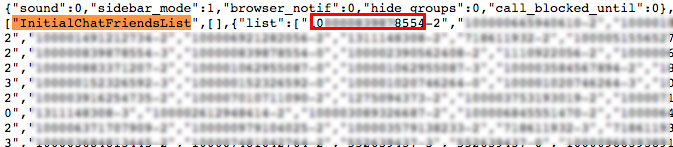
2. It will open the page source of your profile, to find the list simple press CTRL + F (Windows) or Command + F (Mac) and enter InitialChatFriendsList then press enter. You will be taken to the list of code which is Facebook ID’s of your friends.


3. To convert numbers into Facebook profiles, simply put this into your browser address bar https://www.facebook.com/NUMBERID, and change the NUMBERID with the first group digit numbers that you find right after InitialChatFriendsList, do not include number after hyphen (-).


If you are checking source code, and it seems complicated to you, then, you can actually see this visually using chat window. If you are using Facebook in browser, you will see on right side your friends list. You can also use this to observe who you constantly chat with like the InitialChatFriendsList.

What you have to do is turn off the chat and then refresh your web browser, then turn it back on again using the gear icon. The first friend that appears on the top is most likely to be your Facebook friends that you recently interact with.
Read More
  • Share This:  
  •  Facebook
  •  Twitter
  •  Google+
  •  Stumble
  •  Digg

How to See Who Views My Facebook Profile | Who is Looking at My Facebook Account?

 View Profile     No comments   

How to See Who Views My Facebook Profile | Who is Looking at My Facebook Account?: Most users are interested in seeing which Facebook friend or user is viewing their Facebook profile. While there are some programs and browser extension claiming that they can track who is stalking you on Facebook, there are some elements of scams in their activities.

Ensure that you don’t give any access to your account because it may compromise your Facebook privacy. View Facebook Blocked List

How to See Who Views My Facebook Profile | Who is Looking at My Facebook Account?


Unlike other social media, like LinkedIn, you can easily see who’s viewed your profile using the provided tool, but Facebook still not ready to show that feature, although many users wanted to have that.

Is there a way to find out who always viewing my Facebook profile?


While searching and finding a way to see who are checking Facebook profile or if it is possible, I came across in some popular way that are shared online.


Many videos with millions of views and popular pages, sharing the same instruction how to find out who is viewing your Facebook profile, they use InitialChatFriendsList.

This can be found when viewing the source code for your profile and the list of the numbers that follows is the list of ID’s that arranged from top which said the one who constantly viewing your profile.

I will tell you the truth this method is not exactly the list of people that are constantly viewing your profile, instead this is the list of friends that you have recently interacted with (in chat, message, comment thread).

Why I said this is not the list who recently check your profile? Because I tested it, I tell some of my friends to check my profile for some times and check if the list changed, it didn’t.
How to find InitialChatFriendsList

If you still wanted to check using the InitialChatFriendsList, I will share with you the steps. 1. On your Facebook Profile, perform right-click in the empty area on the side, then select “View Page Source”

See:

  • How you can change your Facebook password
  • How to delete Facebook post


2. It will open the page source of your profile, to find the list simple press CTRL + F (Windows) or Command + F (Mac) and enter InitialChatFriendsList then press enter. You will be taken to the list of code which is Facebook ID’s of your friends.


3. To convert numbers into Facebook profiles, simply put this into your browser address bar https://www.facebook.com/NUMBERID, and change the NUMBERID with the first group digit numbers that you find right after InitialChatFriendsList, do not include number after hyphen (-).


  • Learn more from Learn Facebook Basics
If you are checking source code, and it seems complicated to you, then, you can actually see this visually using chat window. If you are using Facebook in browser, you will see on right side your friends list. You can also use this to observe who you constantly chat with like the InitialChatFriendsList.

What you have to do is turn off the chat and then refresh your web browser, then turn it back on again using the gear icon. The first friend that appears on the top is most likely to be your Facebook friends that you recently interact with.
Read More
  • Share This:  
  •  Facebook
  •  Twitter
  •  Google+
  •  Stumble
  •  Digg

How to See Who Views My Facebook Profile | Who is Looking at My Facebook Account?

 View Profile     No comments   

How to See Who Views My Facebook Profile | Who is Looking at My Facebook Account?: Most users are interested in seeing which Facebook friend or user is viewing their Facebook profile. While there are some programs and browser extension claiming that they can track who is stalking you on Facebook, there are some elements of scams in their activities.

Ensure that you don’t give any access to your account because it may compromise your Facebook privacy. View Facebook Blocked List

How to See Who Views My Facebook Profile | Who is Looking at My Facebook Account?


Unlike other social media, like LinkedIn, you can easily see who’s viewed your profile using the provided tool, but Facebook still not ready to show that feature, although many users wanted to have that.

Is there a way to find out who always viewing my Facebook profile?


While searching and finding a way to see who are checking Facebook profile or if it is possible, I came across in some popular way that are shared online.


Many videos with millions of views and popular pages, sharing the same instruction how to find out who is viewing your Facebook profile, they use InitialChatFriendsList.

This can be found when viewing the source code for your profile and the list of the numbers that follows is the list of ID’s that arranged from top which said the one who constantly viewing your profile.

I will tell you the truth this method is not exactly the list of people that are constantly viewing your profile, instead this is the list of friends that you have recently interacted with (in chat, message, comment thread).

Why I said this is not the list who recently check your profile? Because I tested it, I tell some of my friends to check my profile for some times and check if the list changed, it didn’t.
How to find InitialChatFriendsList

If you still wanted to check using the InitialChatFriendsList, I will share with you the steps. 1. On your Facebook Profile, perform right-click in the empty area on the side, then select “View Page Source”

See:

  • How you can change your Facebook password
  • How to delete Facebook post


2. It will open the page source of your profile, to find the list simple press CTRL + F (Windows) or Command + F (Mac) and enter InitialChatFriendsList then press enter. You will be taken to the list of code which is Facebook ID’s of your friends.


3. To convert numbers into Facebook profiles, simply put this into your browser address bar https://www.facebook.com/NUMBERID, and change the NUMBERID with the first group digit numbers that you find right after InitialChatFriendsList, do not include number after hyphen (-).


If you are checking source code, and it seems complicated to you, then, you can actually see this visually using chat window. If you are using Facebook in browser, you will see on right side your friends list. You can also use this to observe who you constantly chat with like the InitialChatFriendsList.

What you have to do is turn off the chat and then refresh your web browser, then turn it back on again using the gear icon. The first friend that appears on the top is most likely to be your Facebook friends that you recently interact with.
Read More
  • Share This:  
  •  Facebook
  •  Twitter
  •  Google+
  •  Stumble
  •  Digg
Older Posts Home

Blog Archive

  • ▼  2019 (30)
    • ▼  January (30)
      • Facebook Lite Download
      • How to Upload High Quality Photos to Instagram
      • Login Instagram Online
      • Who Viewed My Facebook Profile Recently 2019
      • Get Real Instagram Followers
      • Instagram Facebook Login
      • Who Visited My Facebook Profile How to Check
      • Temporarily Disable Facebook Account
      • Free Collage Maker for Facebook
      • How Do I Find My Videos On Facebook
      • People You May Know Facebook
      • How to Find someone On Facebook by Phone Number
      • How Do People Get Famous On Instagram In 2019
      • How to Change Date of Birth in Facebook
      • Posting Multiple Pictures On Facebook
      • How To Find Your Blocked Friends On Facebook
      • How to Get Unblocked On Facebook
      • Add Phone Number to Facebook Account
      • Deactivate Instagram Account Link
      • How We Close Facebook Account
      • How to remove fb temporarily or permanently
      • How to Unsend a Facebook Message | Facebook Messen...
      • How to deactivate your FB account in 10secs | Temp...
      • How can i cancel my Facebook account totally | Clo...
      • FACEBOOK MARKETPLACE BUY AND SELL SAFELY
      • How Do You Know Who Unfollowed You | How to Know W...
      • How To Change My Fb Account Name | Edit Your Faceb...
      • How To Use Facebook As My Business Page - Messenge...
      • How To Add My Phone Number To Facebook | Facebook ...
      • How To Delete A Post From Your Facebook Timeline |...
  • ►  2018 (8737)
    • ►  December (14)
    • ►  November (568)
    • ►  October (269)
    • ►  September (922)
    • ►  August (1873)
    • ►  July (266)
    • ►  June (192)
    • ►  May (1544)
    • ►  April (1335)
    • ►  March (1115)
    • ►  February (639)

Copyright © Facebook Help Center