- Sign in to the Facebook account on which you are an administrator for the group in question.
- Navigate to the Facebook group and then click the "See All" link in the Members section on the right side of the page. This displays a list of all the current group members.
- Click "Remove Admin" beside the name of any group admin whom you wish to remove. Click "Okay" in the small window that opens to confirm that you wish to remove this person as an admin.
- Click "Make Admin" beside the name of any group member whom you wish to make into an admin for the group. Click "Make Admin" in the small window that opens to confirm this decision.
How to see who follows me on Facebook
Access Facebook, Admin Facebook Group, Android, App, FB Fan Page, Followers, Messages, New Facebook, Settings
No comments

See: How to Hide Who You Follow on Facebook
Your friends automatically follow you. You can also let people who aren't your friends follow you.To manage who can follow you:
1. Click
at the top-right corner and select Settings.2. Click Public Posts on the left.
3. Select Friends or Public next to Who Can Follow Me.
Additional Settings
· Public Post Comments: Allows you to select who can comment on your public posts. Learn how to adjust who can like or comment on your public posts.
· Public Post Notifications: Allows you to select if you want to get notifications when people who aren't your friends start following you and share, like or comment on your public posts.
· Public Profile Info: Allows you to select who can like or comment on your public profile information, which includes profile photos, profile videos, cover photos, featured photos and News Feed updates about changes to your Intro section. Learn how to adjust who can like or comment on your public profile information.
See Who's Following You
If you've allowed people to follow you, you can see a list of your followers by going to your profile, clicking Friends below your cover photo and then clicking Followers. If you don't have any followers, you won't see this option
Trump Calls Facebook Ads Latest Part of "Russia Hoax"
Access Facebook, Account, Admin Facebook Group, Android, App, Facebook hoax, Followed Me Hoax, Followers, Hoax, Latest Hoax
No comments

"The Russia hoax continues, now it's ads on Facebook. What about the totally biased and dishonest Media coverage in favor of Crooked Hillary?"
He later added: "The greatest influence over our election was the Fake News Media 'screaming' for Crooked Hillary Clinton. Next, she was a bad candidate!"
Facebook has faced growing pressure from members of Congress to release the content of the ads. The company has already handed over the ads to the special counsel investigating Russian interference in the 2016 U.S. presidential election.
Facebook also says it will now require political ads to disclose both who is paying for them and all ad campaigns those individuals or groups are running on Facebook.
Who Unfriended Me On Facebook App
Access Facebook, Account, Admin Facebook Group, Android, App, FB, Follows Me, Messages, Messenger
No comments

Facebook, the social media titan which has more than 100 million customers from all over the world is understood for maintaining every feature which customers can request for, however the function which they do not have is that you can not to see who unfriended you. Its a minor thing but comes useful in figuring out the social contacts you may have lost.
Essentially there are two approaches to discover that who unfriended you on Facebook. Initially one is with a web browser addons/extensions and also various other is a 3rd party site.
See: Following Me Facebook Latest Hoax
Who Unfriended Me On Facebook AppInternet browser Add-on/Extension method1. Firstly, install the plugin for you browser. For Firefox and Chrome. [Modify - Added another extension's link for Chrome as previous one was eliminated by the expansion writer]2. Allow it collect the listing of your Facebook buddies, it might take 2-3mins depending on your buddies count.
3. Now you are prepared to go. Whenever somebody will unfriend you, it will show notice as I revealed listed below.

If in instance it did disappoint? then simply most likely to your friend under Timeline account. It will certainly have "Lost Pals" tab. Click on it to watch the pals it will reveal.
Third celebration method
1. Go to this internet site - Who.Delete.Me.
2. Visit with your Facebook account. See to it to enable him needed consents
How Can I Tell if someone Unfriended Me On Facebook
Access Facebook, Account, Admin Facebook Group, Delete Facebook, Delete Facebook Group, Followed Me, Mobile, Name, New Facebook, Pages
No comments

Essentially there are two approaches to discover that who unfriended you on Facebook. Initially one is with a web browser addons/extensions and also various other is a 3rd party site.
See: Following Me Facebook Latest Hoax
2. Allow it collect the listing of your Facebook buddies, it might take 2-3mins depending on your buddies count.
3. Now you are prepared to go. Whenever somebody will unfriend you, it will show notice as I revealed listed below.

Third celebration method
1. Go to this internet site - Who.Delete.Me.
2. Visit with your Facebook account. See to it to enable him needed consents
See: How can I see who follows me on Facebook
How to Insert Facebook Icon for Website?
Access Facebook, Admin Facebook Group, App, Delete Facebook Group, Download, Facebook for Business, Facebook Page, Followers, Settings
No comments
Learn more from Learn Facebook Basics
After you select the appropriate category, find an icon that blends well with your website. Select it and then select the size you need. If you don’t know what size you need, download all the sizes and save them to your computer. Then you need to send these images to your webmaster to place on your website or do the job yourself.
Whose Been Looking at My Facebook Page
Access Facebook, Account, Admin Facebook Group, Business Page, Delete Facebook Group, Facebook followers, Facebook for Business, FB Fan Page, Page
No comments
Learn more from Learn Facebook Basics

Whose Been Looking At My Facebook PageAt Facebook's official assistance web pages, Facebook straightly tells that it's not feasible to track that is seeing your profile. So if any application is declaring or doing this task for you, it's definitely breaking Facebook's!
I found some applications Which are Providing to Track Stats of That is Watching My Account! Does they actual or fake?
Currently I likewise obtaining some sites as well as apps which are screaming that they could assist make use of to know of somebody's visiting our profile. But I intend to inform you that they are completely phony. Because Facebook have actually already stated, "Applications COULD NOT track profile gos to for users that just most likely to another person's account; Facebook has actually made this practically difficult".
So why you are still relying on those applications. Application doing these are actually frauds. They will attract you to use them as well as reveal you some incorrect results. In fact they need huge site visitors making their other functions done. These jobs may include "Getting Web traffic", "Hacking Accounts", "Generating income from ads" and more!
Even more suggestions ...
Its natural, but i have seen many people obtaining tricked by Third party software that does not supply proper results but just spams on their Facebook Wall surface's, so here's a wonderful trick that'll assist you discover that sees your profile one of the most!

Just how Can I track down who visited my Facebook account?Its easy to do. Just adhere to these steps and also you'll prosper in discovering that visited your Facebook Profile!
1. Go To Your Facebook timeline- facebook.com/xyz.
2. Right click on your timeline as well as hit "View page Source".
3. Now, you'll be rerouted to a brand-new page with great deals codes.
4. Hold CTRL+F on your keyboard, a text box shows up at the appropriate corner, in that box, kind- "InitialChatFriendsList" (Don't include Quotes).
5. Next to that word, you'll see a listing of numbers, these are the profile ID's of people that visit your timeline.
Simply most likely to "facebook.com" and paste the ID number next to it with a "". As an example, if the ID is abcd, you have to place it as- facebook.com/abcd.
The first ID shows the one who sees profile regularly while the last ID never ever sees your profile!
Please kindly share this overview with others. Thank You !!!
How to Unblock Friends On Facebook
Access Facebook, Account, Admin Facebook Group, Facebook App, Facebook followers, People, Profile, Unblock
No comments


SnapChat Login and Sign Up with Facebook
Access Facebook, Account, Admin Facebook Group, Android, App, Facebook App, Facebook Login, Login
No comments

In this Snapchat sign in guide, we shall be giving you all the simple steps required from you to login Snapchat account through the online web, that is to login using Chrome or Mozilla browser without any issue. Have it in mind that Snapchat Login online on web is very easy, so let’s check it out bellow.
Steps for Free Snapchat Online Login – Snapchat LoginThe following are the simple steps which you need ti take for Snapchat online sign in via the official website. The steps are explained in the following section:
- Visit the Snapchat Login Online website by clicking here
- You will get a window, in which you are requested to enter two information. And they are Username and Password.
- After you have entered the login credentials, click on the LOG IN button.
Basic Features of SnapChat Apk for Android | Snapchat for PC
- Using multiple filters on one snap.
- You have got friend emojis, which appears next to the person who has added on the Snapchat Online.
- You are suggested to turn on the Travel Mode on since the app consumes a good amount of data and battery of your phone.
- You may find some of the old Lenses replaced with other updated lenses on the app.
- You can add your Birthday information on this application.
- The app has got a night camera mode, which offers decent pictures if taken in the dark.
How to Login SnapChat on Android Phone – www.snapchat.com Sign in The steps that are to be followed for Snapchat Log in online with Android are as shown bellow.
- Go to Google Play Store. Or download direct from https://www.snapchat.com/download
- Install Snapchat apk by clicking the Install button in the first screen only, tap on this button.
- After the installation, create a new Snapchat account on the app.
- Click on AAccept to give the app Access to your Contacts, location, Camera etc, which is required for adding your friends on the app.
The user is required to choose the appropriate ones, which they want to use on Snapchat Online.
The next to show you is Snapchat sign in with iPhone which is probably the most used device for Snap chat this days. Though Snapchat log in on iPhone is similar to that of Android discussed in the previous section
Steps for Snapchat Log in with iPhone The steps for Snapchat Login with iPhone are as follows:
- Go to Apple Store for iOS users
- Search for Snapchat in the Apple Store and click on the Install button.
- As soon as the installation ends, start the application on your phone.
- You need to do Snapchat Sign Up. But if you already register Snapchat account, then you can easily login by using the login details
- Keep the username such that your friends can easily identify you, using the name itself.
If I Block Someone On Facebook
Access Facebook, Account, Admin Facebook Group, Create New Facebook, Facebook followers, People
No comments

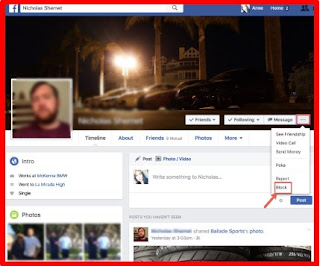
If I Block Someone On FacebookSTEP 1: Go to your good friends list.
Access your close friends list via your Facebook profile. Click "Friends".

Action 2: Pick from good friend's listing. Choose the person you wish to obstruct.

Step 3: Block good friend.To block your friend, click the ellipses button located alongside the message switch on your pal's cover picture. Click "Block".


Step 5: Click "Okay".Click "Okay" to continue.

Action 6: You're Done!The person you obstructed will be noted under "Block customers" on your Facebook setups. To unblock your good friend, click unblock. Unfortunately, since blocking somebody deletes them off of your good friends listing, you would require to resend them a close friend demand to recover them to your listing after uncblocking. For even more details on blocking customers, go to the Facebook Assistance Center.

Send A Friend Request On Facebook
Access Facebook, Account, Admin Facebook Group, Android, App, Create New Facebook, Mobile, Name, Pages, People, Profile
No comments

To send a Buddy demand you require to understand him outside Facebook. you can even Add Buddy if you also do not know him outside. However ensure not to send out pal request to way too many of them, this may cause the Block of your Account for few days.
* Visit to your Facebook account by entering into www.facebook.com or www.fb.com.
* After that Search for the Person you wish to friend demand on the Look bar of Facebook.
include pal on Facebook.
* After you search the Account or Profile you want to send the Buddy demand you will certainly have the option to ADD GOOD FRIEND.
Add close friend on Facebook.* Click the ADD Friend as well as the Close friend Demand will be sent out to the individual, wait till he approves your Buddy demand.
Include Good Friends on Facebook:The Close friend Demand could be sent to everybody you understand yet make certain you understand him personally as well as times you could not find ADD BUDDY option on some Accounts, ask the individual to send you the Friend request if you recognize him personally. If you have no idea him then you can not make buddy with that individual, however you will have an alternative to Adhere to the individual where you could get all updates of that individual.
Final thought:You can send out Pal Demand, if not you could comply with as well as know their status on your information feed. See to it to expand your FB close friend listing in a great way. Do not spam on Facebook
Viewing Blocked List On Facebook
Access Facebook, Admin Facebook Group, Block, facebook account, Facebook followers, Followers, Following Me, Profile
No comments
Facebook is a social network that runs via the power of friendship - blocking so many people won't help you and not blocking annoying Facebook friends won't be an option either.
So how do you go about accessing those friends or Facebook users that you've blocked? We shall see how to locate users blocked by you on FB.

Your future spouse might be on your Facebook blocked list.
Sometimes go to your Facebook Blocked List just to see how your prisoners are doing.
Facebook Username Change
Access Facebook, Account, Admin Facebook Group, Changing Facebook Password, Create New Facebook, Create New Facebook Page, facebook account, Facebook followers, Name, People, Profile
No comments
Actions To Modification Username Of Facebook Account.Recently facebook have upgraded this functionality. This 2016 facebook just enable to alter username two times and now we could change account username unrestricted time with no worry.
Action 1. Visit to Facebook on a desktop computer with the account you desire to alter username of.
Action 2. Go to your profile setups and there is Second choice for username in general settings.

Action 3. Click on "Edit" option beside username.

The Best Ways To Modification Username Of Facebook Web Page.If you are searching for a means to change the username of your web page on Facebook, adhere to the steps below.
Action 1. Log into your Facebook account and also open the web page on a desktop.
Step 2. Click "About" on the left side of your Page.
Action 3. Click Page Info and after that Click to edit the Username area.

Step 4. Get in a brand-new username as well as if the username is available, click Create Username.
How You Can Declare Facebook Username That Is Currently Used.If you want a certain username but it is currently asserted by someone else else, we have a costs technique for you. By this technique, you could claim a username if it is already used by an additional Facebook customer.
* Please click on the web link below for the guidelines for the premium approach on Ways to claim a username which is currently utilized.

To conclude, we hope this short article on exactly how to transform username on Facebook web page or profile is helpful to you. For any kind of aid, don't hesitate to contact us in comments below.
How Do I Unblock someone From Facebook
Account, Admin Facebook Group, facebook account, Facebook App, Facebook followers, People, Profile
No comments

menu on their cover photo.- Click
in the top right of any Facebook page
- Click Privacy Shortcuts
- Click How do I stop someone from bothering me?
- Click View All Blocked Users.
- Click Unblock next to the name of the person you want to unblock.
HOW TO TELL IF YOU HAVE BEEN POKED
Access Facebook, Account, Admin Facebook Group, facebook account, Facebook App, Pages, People, Poke
No comments
POKE APP

To poke someone via the poke app:
- Download the app onto your phone.
- Log into your Facebook account in the app.
- Confirm that you want to use the app under that name.
- Select “Poke a friend with a message, video or chat.”
- Type in the name of your friend or select a name from your list of contacts.
- Type in your message, and select a photo or video. If you want to add text to a photo or video, tap the screen and hold, and then type in your message or draw on the photo.
- Select how long you want the message to display.
- Hit “Send.”
Keep in mind that while pokes disappear after the time limit, they are still retrievable from Facebook for 90 days. If a friend snaps a screenshot of your poke, Facebook will send you a notification by flashing an icon next to the poke app on your home page to let you know. Facebook recommends contacting the friend and asking him or her to remove the screenshot directly if you do not wish to have it displayed.
Facebook Group Names Ideas
Access Facebook, Admin Facebook Group, Business Page, Facebook, facebook account, Facebook App, Facebook followers
No comments
Compounding the issue, if you're not an admin for a Facebook team, you will not have accessibility to the setups choices like transforming the team name.
However let's consider it much more carefully, starting with a quick peek into the Buddies of Ask Dave Taylor group. The leading banner for the team looks like this:

Notification I have actually clicked on the "• • •" button on the visuals and a menu has actually appeared. Allow's consider the menu a bit more very closely:

Assuming you do, nonetheless, below's just what you'll see:.

Here's where I can straight change the name of the group. Actually, I'm most likely to do just that by adding ". com" to the group name. I'm likewise going to transform the dull default group icon to another thing. That's accomplished by clicking on the current symbol, which turns up a menu complete of fun choices:
How to Delete A Created Facebook Page 2018
Access Facebook, Account, Admin Facebook Group, Android, Create New Facebook Page, Facebook Page, Mobile, Profile
No comments
Likewise note that if there are other admins in the page - it's your duty to allow them know that you will certainly set up the page for deletion else they might go back after you have actually timetable the page for removal and also terminate the deletion procedure.

If you have fully composed your mind to allow go of your Facebook account, after that you need to check to see that you are the admin of the web page you prepare to remove, you'll require an admin login priviledge of that certain web page you wish to obtain eliminate. If you are certain you possess that page, then comply with the steps underscored listed below to quickly eliminate your Facebook page.
How you can get rid of a Facebook Page.
1. Click Setups on top of your Page.
2. From General, click Eliminate Web page.
3. Click Remove [Page name]
4. Click Erase Web Page and also after that click OK.
Likewise remember your Web page won't be completely erased until 14 days has expired, yet you can unpublish your Page any time.
Exactly how to cancel or Undo Facebook Web page deletion.
Follow the tips below to cancel your Facebook page removal:
1. Most likely to your Page within 2 Week of organizing to remove your Page.
2. Click Cancel Removal at the top of your Web page.
3. Click Confirm then click OK.
Keep in mind that you can also delete your individual Facebook account.
Keep in mind: In the situation where you cannot locate the delete alternative on your FB Web page, ensure that you're truly an admin of that Web page.
Is this overview still perplexing or do you discover anything hard to do? Please leave us with a remark explaining the problem or read these overviews:.
Please share this article on Facebook.
Trump Calls Facebook Ads Latest Part of Russia Hoax
Access Facebook, Account, Admin Facebook Group, Android, App, Facebook hoax, Followed Me Hoax, Followers, Hoax, Latest Hoax
No comments

"The Russia hoax continues, now it's ads on Facebook. What about the totally biased and dishonest Media coverage in favor of Crooked Hillary?"
He later added: "The greatest influence over our election was the Fake News Media 'screaming' for Crooked Hillary Clinton. Next, she was a bad candidate!"
Facebook has faced growing pressure from members of Congress to release the content of the ads. The company has already handed over the ads to the special counsel investigating Russian interference in the 2016 U.S. presidential election.
Facebook also says it will now require political ads to disclose both who is paying for them and all ad campaigns those individuals or groups are running on Facebook.
How Do You Remove A Group From Facebook
Access Facebook, Account, Admin Facebook Group, App, Create New Facebook, Delete Facebook Group, Delete FB, Facebook Delete, Facebook followers, Profile, www.facebook.com/help/delete account
No comments

Easy there, fella! Facebook may be anxious to accumulate as much data as feasible as well as may well be more enthusiastic concerning assisting us produce something than remove it, but I do not believe it's an international conspiracy nor do I assume that either the X Data or aliens are entailed.
How Do You Remove A Group From Facebook
The manner in which you remove a Facebook Group is to eliminate each and every single member. When you get rid of the last participant, you also erase the Group.
If your Group has four people, no worries, but if it has numerous participants? Yeah, you have fairly a task ahead of you!
The issue is, when you go to your Group, you see something such as this:


However it's not. Bear in mind, to eliminate an Facebook Group, you have to get rid of every member, so in fact the path you should take is to click the "See All" link on the Participants listing:
Once you do, you'll see a checklist of all Group participants with an "X" (see, I told you Facebook suches as those "X" erase buttons) nearby:
Click on the "X" as well as you'll be asked if you truly intend to remove that participant, as I'm being shown when I determine Klaus does not need to be in the Group:
As soon as you get to the really last participant, nevertheless - and that need to be on your own, to make sure that you don't have the Group slip through your electronic fingers-- the timely adjustments:

Truly prepared to get rid of that Facebook Group? Click "Delete Group" and it's done.
How to Deactivate My Facebook Account Guide
Access Facebook, Account, Admin Facebook Group, Delete Facebook, Delete Facebook Group, Delete FB, Facebook Delete, www.facebook.com/help/delete account
No comments

How Deactivate Facebook Account
You can deactivate your Facebook account temporarily and choose to come back whenever you want.
To deactivate your account:
- Click the account menu
at the top right of any Facebook page - Select Settings
- Click General in the left column or visit: web.facebook.com/settings?tab=account
- Choose Manage your account then follow the steps to confirm
If deactivating Facebook is not you want and you want to delete your account permanently, then take a look at our recent post: How can i delete my Facebook account permanently?