• Facebook Help Center

The Facebook hoax that is scaring people into thinking they are being stalked

 Followed Me Hoax, Followers, Following Me, Follows Me, Hoax, Latest Hoax     No comments   

There is a Facebook hoax that is scaring users into thinking they are being stalked. Users of the social media platform are spreading the myth that a hidden list could expose your covert "followers".
These followers would effectively be secretly stalking you and all your statuses and updates.

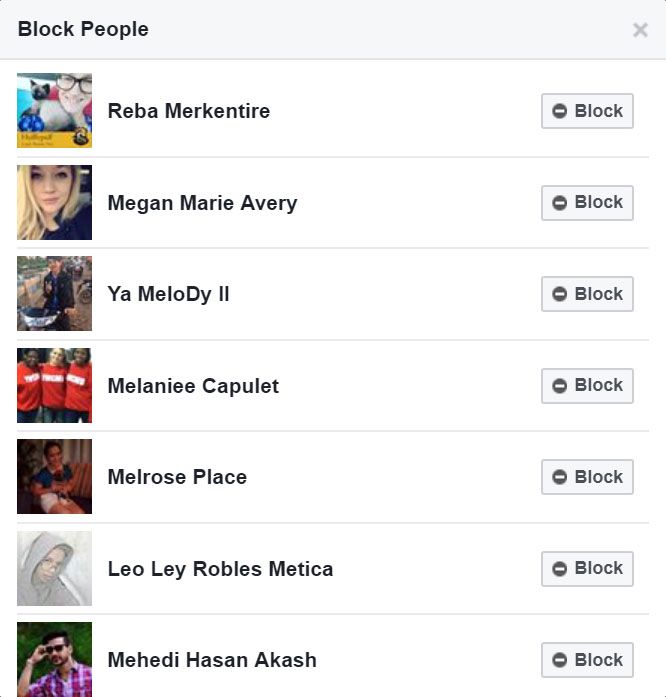
According to the rumor, Facebook would give you a list if you go to the block section of settings and type in “following me”.

Facebook Hoax

Unfortunately, this idea is nothing but a ruse - and an old one at that!

Regardless, a message is spreading across the Mark Zuckerberg-owned website - and people are getting frightened, the Birmingham Mail reports.

One user wrote: " I Just learned something new. If you go to account settings, blocking, block users, and type in “following me”, without the quotes, you might be surprised just who is following you. I had a lot people on it that I had no clue who they were. They are blocked now. I had to block them one at a time. Creepy..most were middle eastern. And all my posts are to friends, not public."

Experts have outed the whole thing as nothing but a ruse to scary people, though.

The hoax has done the rounds previously, but is seemingly picking up serious traction this week.
Read More
  • Share This:  
  •  Facebook
  •  Twitter
  •  Google+
  •  Stumble
  •  Digg

The following me list on facebook is a hoax

 Facebook Spaces, Followed Me, Followers, Following Me, Hoax, Latest Hoax, Login, Messenger, Mobile     No comments   

If you’ve been on Facebook over the last couple of days, you’ve probably seen some version of this chain message going around: If you go into your ACCOUNT SETTINGS then to BLOCKING (on left side of screen), then in the BLOCKED USERS search bar type in “following me” without the quotes, you might be startled by who is following you. Unfortunately you have to block them 1 at a time, which is annoying. I had 20 in the list and knew none of them. I blocked all of them. You might share or copy/paste if you found this helpful.

Like many things on Facebook, it’s totally false. Yes, if you input “following me” into the search bar you’d otherwise use to block people, a string of seemingly random people will come up. But unlike what the perpetrators of this hoax may want you to think, these accounts don’t belong to some secret network of spies — nor are they part of a grand conspiracy on the part of Facebook. Rather, they’re just the unfortunate victims of a misused search function.


They definitely aren’t stalking you.Here’s why: When you search “following me,” Facebook doesn’t show you who is actually following you. (If you actually want to see that list, you have to click on the Followers section under your Friends List.) Searching this term on your Block page pulls up a list of users whose names and general information match the terms following and me as closely as possible. And though you see the names of all of the corresponding users, what you don’t see is all of the hidden and private information Facebook derives its matches from — like nicknames, “About Me” descriptions, and employment information. And that’s what the list is actually being generated from.

Unfortunately, however, everyone who’s fallen for the hoax is pulling up this list, and many of them are desperately contacting the people on it, demanding to know why they’re being followed. For the most part, the people who match these criteria are unfortunate randos — most of whom have their Facebook accounts locked down. But there’s another category of people who appear on the now-infamous list: fun-seeking trolls.

The messages never end when you’re on the List.Photo: Reba Merkentire“I saw the chain letter being posted on a few of the timelines of my friends yesterday morning,” Facebook user Melissa Freck explained to me. “I’ve blocked folks before, so I knew that typing ‘following me’ into the block-people list would show me nothing but random folks. So I decided to update my nickname to ‘following me’ to see if I would get a response.”

And, boy, did she get a response. Soon after changing her nickname, Freck’s inbox was flooded with thousands of messages from people asking who she was and why she was following them.

But Freck is far from the only person to try this. Facebook user Reba Merkentire did the same: “I’ve probably gotten over a hundred friend requests, and it’s really hard to keep up with the stuff, because a lot of people want to message you and be like ‘fuck you’ and then immediately block you afterward.”


However, the messages sent by Facebook’s most gullible are anything but routine. “The most absurd thing was a guy asking to see my boobs,” Freck told me. “I did have one person just spill their life story about losing two children. I felt I needed to respond to them whether it be true or not, because they seemed to be in a dark place. I have been in that dark place and am thankful for the friends that got me through it.”

Being exposed to the brunt of a Facebook hoax’s power is apparently pretty harrowing. Quite a few voluntary members of the “following me” list quickly removed themselves after finding their inboxes flooded with messages. And for users like Freck, the experience has changed how they view the social-media platform as a whole. “Facebook is an animal,” said Freck. “I do not know how else to put it. It reaches billions of people. Unfortunately, it reminds me of the telephone game. People are [too] quick to jump on the bandwagon. We need to slow down and evaluate things before we jump into pointing fingers and accusations.”
Read More
  • Share This:  
  •  Facebook
  •  Twitter
  •  Google+
  •  Stumble
  •  Digg

“Following Me” on Facebook Reveals Secret Followers - Truth or Just a Facebook Hoax?

 Followed Me Hoax, Followers, Following Me, Hoax, Latest Hoax     No comments   

Search “Following Me” on Facebook Reveals Secret Followers - Truth or Just a Facebook Hoax?: By going to the “blocking” tab on Facebook and searching for the phrase “following me” a list of unwanted and/or secret followers who are monitoring your account can be revealed.

Searching “Following Me” on Facebook Reveals Secret Followers-Fiction | Facebook Hoax


The Truth:

False claims that searching lists of blocked users for the phrase “following me” reveals a list of secret followers (or stalkers) is a new take on an old hoax.

A rash of posts making the “following me” claim popped up on September 21, 2017. It’s not clear where the claim started, but there are many different versions of it. Oftentimes, these posts claim that a friend or acquaintance used the “following me” trick to reveal dozens of unauthorized stalkers,
 mostly from foreign countries:


Facebook posts claiming that searching blocked users for the phrase “following me” reveals unwanted followers surfaced in September 2017.

In reality, searching a list of blocked users for”following me” on Facebook will bring up a list of profiles containing the phrase “following me” — not a list of unwanted followers. One Facebook user proved this by changing her profile nickname to “following me.” Dozens of people who searched “following me” sent angry messages to the woman after her account turned up in their search results. Given that the woman wasn’t an actual secret follower, “following me” is nothing more than a keyword search.


A Facebook user proved that typing “following me’ into Facebook is nothing more than a keyword search.

This isn’t the first time this hoax has circulated either. In January 2017, a different version falsely claimed that searching blocked users for “Facebook security” revealed a list of secret stalkers. Again, this nothing more than a keyword search and doesn’t provide any measure of security.

Given that cybersecurity is a big issue on Facebook, these bogus claims can be especially dangerous. Facebook offers a number of legitimate security measures that can help users protect against unwanted followers.

For example, Facebook allows you to block individual users. Once they’re blocked, users are no longer able to see your posts, they’ll be unfriended (if they were a friend in the first place) and they won’t be able to tag you in things they post on their timeline. So, in effect, there’s no such thing as a secret follower or secret stalker.


And if you can’t find a person who you want to block, you can search for the person’s email address under the “blocking” section of the settings tab. Any account associated with that email will be blocked from following you. But typing “following me” into Facebook is nothing more than a keyword search and won’t reveal unwanted followers.

Search “Following Me” on Facebook Reveals Secret Followers - Truth or Just a Facebook Hoax?

Read More
  • Share This:  
  •  Facebook
  •  Twitter
  •  Google+
  •  Stumble
  •  Digg

'Following Me' Facebook Hoax

 Facebook hoax, Followed Me Hoax, Hoax, Latest Hoax     No comments   

A message is spreading out throughout Facebook that declares customers could see who is discreetly following them by going to the obstructing area of their setups and keying in "following me". This is simply the most up to date variant of a long-running scam that greater than most likely initially generated as an outcome of a misconception of Facebook's privacy setups.

Following Me Facebook Hoax

An instance could be seen listed below.

I Simply found out something brand-new. If you access your account setups, obstructing, block individuals, and also enter "following me," without the quotes, you may be stunned simply by the number of people following you. I had a whole lot people on it that I had no hint that they were. They are obstructed currently. I needed to block them individually. Weird. Most were center eastern. As well as all my articles are to pals, not public.

First of all - NO, inputting "following me" in the Obstructed individuals textbox does NOT supply a listing of individuals that are following you.

See: How to Block Someone From Following You on Facebook Page

Exactly what it DOES do is raise a checklist of people related to words you entered right into the textbox - in this situation words "complying with" and also "me." This could indicate those words show up in a customer's name, intro or any one of their Regarding Me areas. Provided the instead universal nature of words "adhering to" as well as "me," customers that adhere to the directions are greater than most likely visiting an instead arbitrary (as well as entirely benign) checklist of Facebook individuals show up.


FACEBOOK HOAX

To repeat, these individuals will certainly have the little link with you and also are not following you.

This is not the very first time this variant of rubbish has flowed online. This scam traces back to around 2011 when a rumor advised individuals to enter words "Automation Labs" right into the very same box to see their stalkers-- guidelines that unsurprisingly merely supplied a listing of individuals that had words "automation laboratories" in their account.

After that at the beginning of 2017 one more variant of this rumor showed up, just this moment receivers were prompted to enter "Facebook Safety and security" right into the textbox which would certainly [apparently] expose a checklist of "paid stalkers." Rather, it acquired up a list of individuals with either "Facebook" or "Safety" in their name or Regarding area.

Rubbish ... yes. Why Facebook would certainly carry out an attribute that would indeed permit individuals to see their paid stalkers or "hidden fans" appears strangely counter-productive, yet this sensible defect hasn't already seemed to quit these rumors from going viral, frequently.

When it comes to this certain version, if you do wish to see that follows you, assuming you have the function allowed, you could see by browsing to your timeline and also look beneath your intro and also click the Complied with by ... web link (see photo.) Individuals that follow you could see your PUBLIC messages on their newsfeed. Messages readied to Pals are just noticeable to friends, not to fans.

See: How can I see who follows me on Facebook


FACEBOOK HOAX

Thus, declares that inputting in "following me" in the Obstructed customer box will certainly expose clients that are following you is utterly full rubbish.

.


Read More
  • Share This:  
  •  Facebook
  •  Twitter
  •  Google+
  •  Stumble
  •  Digg

Following On Facebook

 Account, Android, App, Followers, Following Me, Follows Me, Hoax, Latest Hoax, Messages, Messenger, Pages     No comments   

How can I see who follows me on Facebook? I recognize this trouble. I also have remained in there. It's really easy. As opposed to informing you, allow me to reveal you exactly how it's done.
Facebook Followers

See: Who Owns Whatsapp?

How Can I See Who Follows Me on Facebook
STEP 1:
Login to your Facebook account and also most likely to your account. The 2nd arrowhead down must offer the variety of fans you have. Occasionally it's missing out on. So go on to following the steps.

Facebook Followers

STEP 2:
Click the fall switch received the image listed below.

Facebook Followers

STEP 3:
It ought to offer you something like the picture listed below. Currently, click Setups as revealed following.

Facebook Followers

STEP 4:
After clicking setups, a web page something similar to this will indeed turn up. Currently, click Public Posts. As revealed listed below.

Facebook Followers
STEP 5:
After action 4, you ought to have something similar to this before you. In the picture revealed Listed below, inside the red box location you could locate your Magic fans number before your name.

Facebook Followers

I wish this assists. Many thanks for the analysis.

See: How to Sign In to Facebook Messenger


Read More
  • Share This:  
  •  Facebook
  •  Twitter
  •  Google+
  •  Stumble
  •  Digg

Truth About Facebook Follow Me Hoax

 Facebook hoax, Followed Me Hoax, Hoax, Latest Hoax     No comments   

A message is spreading out throughout Facebook that declares customers could see who is discreetly following them by going to the obstructing area of their setups and keying in "following me". This is simply the most up to date variant of a long-running scam that greater than most likely initially generated as an outcome of a misconception of Facebook's privacy setups.
The Truth:
False claims that searching lists of blocked users for the phrase “following me” reveals a list of secret followers (or stalkers) is a new take on an old hoax.

A rash of posts making the “following me” claim popped up on September 21, 2017. It’s not clear where the claim started, but there are many different versions of it. Oftentimes, these posts claim that a friend or acquaintance used the “following me” trick to reveal dozens of unauthorized stalkers,
 mostly from foreign countries:


Facebook posts claiming that searching blocked users for the phrase “following me” reveals unwanted followers surfaced in September 2017.

In reality, searching a list of blocked users for”following me” on Facebook will bring up a list of profiles containing the phrase “following me” — not a list of unwanted followers. One Facebook user proved this by changing her profile nickname to “following me.” Dozens of people who searched “following me” sent angry messages to the woman after her account turned up in their search results. Given that the woman wasn’t an actual secret follower, “following me” is nothing more than a keyword search.
Read More
  • Share This:  
  •  Facebook
  •  Twitter
  •  Google+
  •  Stumble
  •  Digg

Facebook "following Me" Hoax Suggests That Users Can Reveal Secret Stalkers

 Facebook hoax, Followed Me Hoax, Followers, Following Me, Hoax, Latest Hoax     No comments   

A hoax Facebook post is spreading misinformation about the website's Block function by suggesting users can discover if they are being stalked by strangers.
A message being shared on the social media platform instructs users on how to find a list of strangers who aren’t their Friends, but are following their activity.

The post advises users to search "Following Me" on the Blocked section of Facebook's profile settings, which will draw up a list of names.
Facebook Follow button

However, rather than a list of secret followers, the results are the names of people whose profiles include the letters from the words “following” and “me”. These words could appear in the user’s name, or any part of their profile.

“Learned something that was rather disturbing tonight. Time to tighten up security on your Facebook profiles!!” the hoax reads, “I just blocked about 20 foreign people from following my profile and I thought I was already locked down! If you go to Account Settings > Blocking > Block Users and type in ”following me“, without the quotes, you may possibly see a bunch of people following you that you don't know Block each one and confirm!”

Currently, Facebook doesn’t allow users to see who is viewing their profile and has made no plans to introduce this feature.

The following button does however allow strangers to see public changes to your Facebook profile.
Read More
  • Share This:  
  •  Facebook
  •  Twitter
  •  Google+
  •  Stumble
  •  Digg
Newer Posts Older Posts Home

Blog Archive

  • ▼  2019 (30)
    • ▼  January (30)
      • Facebook Lite Download
      • How to Upload High Quality Photos to Instagram
      • Login Instagram Online
      • Who Viewed My Facebook Profile Recently 2019
      • Get Real Instagram Followers
      • Instagram Facebook Login
      • Who Visited My Facebook Profile How to Check
      • Temporarily Disable Facebook Account
      • Free Collage Maker for Facebook
      • How Do I Find My Videos On Facebook
      • People You May Know Facebook
      • How to Find someone On Facebook by Phone Number
      • How Do People Get Famous On Instagram In 2019
      • How to Change Date of Birth in Facebook
      • Posting Multiple Pictures On Facebook
      • How To Find Your Blocked Friends On Facebook
      • How to Get Unblocked On Facebook
      • Add Phone Number to Facebook Account
      • Deactivate Instagram Account Link
      • How We Close Facebook Account
      • How to remove fb temporarily or permanently
      • How to Unsend a Facebook Message | Facebook Messen...
      • How to deactivate your FB account in 10secs | Temp...
      • How can i cancel my Facebook account totally | Clo...
      • FACEBOOK MARKETPLACE BUY AND SELL SAFELY
      • How Do You Know Who Unfollowed You | How to Know W...
      • How To Change My Fb Account Name | Edit Your Faceb...
      • How To Use Facebook As My Business Page - Messenge...
      • How To Add My Phone Number To Facebook | Facebook ...
      • How To Delete A Post From Your Facebook Timeline |...
  • ►  2018 (8737)
    • ►  December (14)
    • ►  November (568)
    • ►  October (269)
    • ►  September (922)
    • ►  August (1873)
    • ►  July (266)
    • ►  June (192)
    • ►  May (1544)
    • ►  April (1335)
    • ►  March (1115)
    • ►  February (639)

Copyright © Facebook Help Center