• Facebook Help Center

Boost Followers on Facebook

 Facebook followers, Followers     No comments   

Boost Followers on Facebook: Spending a lot of time to develop content to share on Facebook, sometimes you still have a decline of organic reach. This why you need to boost your Facebook page.This actually means paying to get your content viewed by people.We would show you just how to, so you can make the most of it. Basically the benefits of boosting your page includes: Get a wider, targeted audience, make up for declining organic reach, and gain access to analytics.


Boost Followers on Facebook

1. Choose a post to boost

If you’re going to be drafting a post that you want to boost right out of the gate, click the grey Boost Post button in the lower-right corner of the post box.
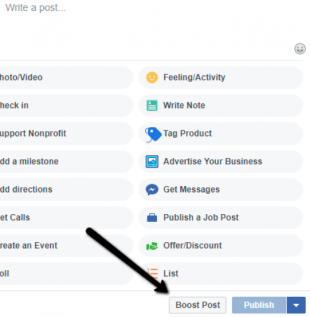

If you’d like to boost an already existing piece of content, click the blue Boost Post button in the lower-right corner of the post you want to boost. Or, you can navigate to the Insights tab and see a list of all your posts. Each will have a Boost Post button next to it.



2. Target your audience

After you have clicked the Boost Post button you’ll be taken to a menu where you can begin to select targeting options. By default, you could opt to include only people who currently like your Page, or all current followers and their friends. However, most businesses prefer a demographic specific target, based on age, location, sex, or interests. If you want to create a custom audience (or more than one) for your boosted post, click the Create New Audience option.
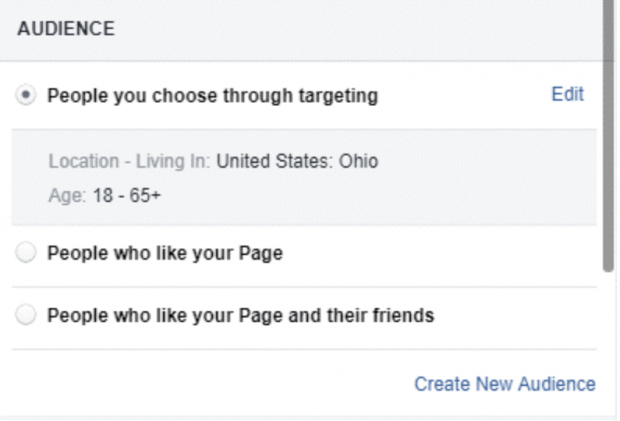

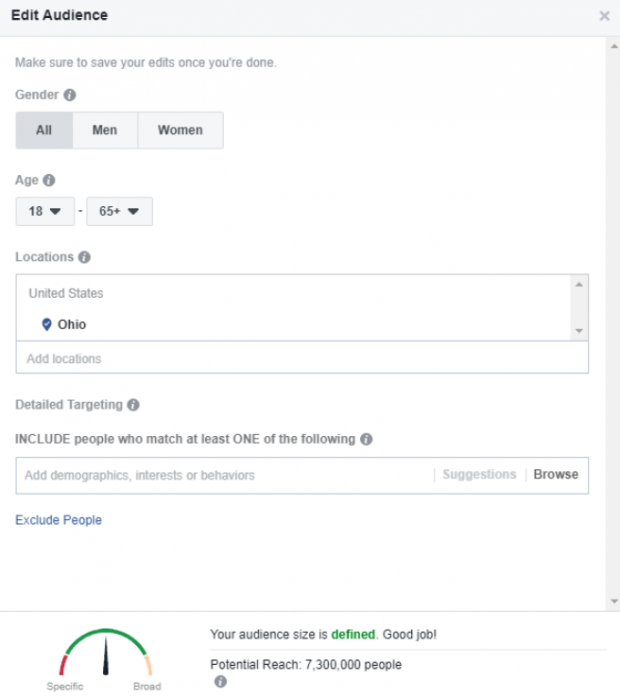
From there, you’ll have the ability to define your audience however you’d like. Here, you can add or remove locations, set the age range, and even include people who are interested in specific topics or pages.

3. Set your budget

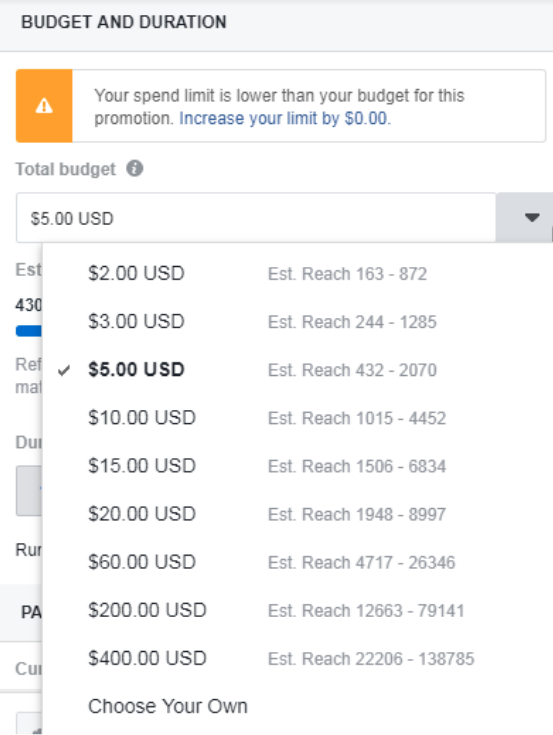
Once you’ve defined your target audience, you’ll need to choose a convenient budget for your campaign. Since your audience is set, you’ll have a realistic gauge for how far your post can reach under each budget tier. Remember, the minimum is $1 per day; this budget will be your total budget for the campaign, spread across however many days you want to run it.

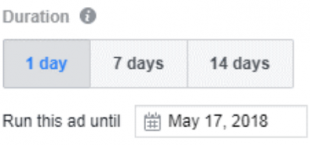
4. Set the boost duration

Next, you will need to decide how long you want your post to run. By default, you can choose one day, seven days, or 14 days. Or you can choose to run the ad until a specified date in the future.

5. Preview the post

It would be nice if you review the ad copy and creative. Make sure it’s free of errors, that all the links work, and all the visual elements look good. This is your last chance to make changes before it goes live.

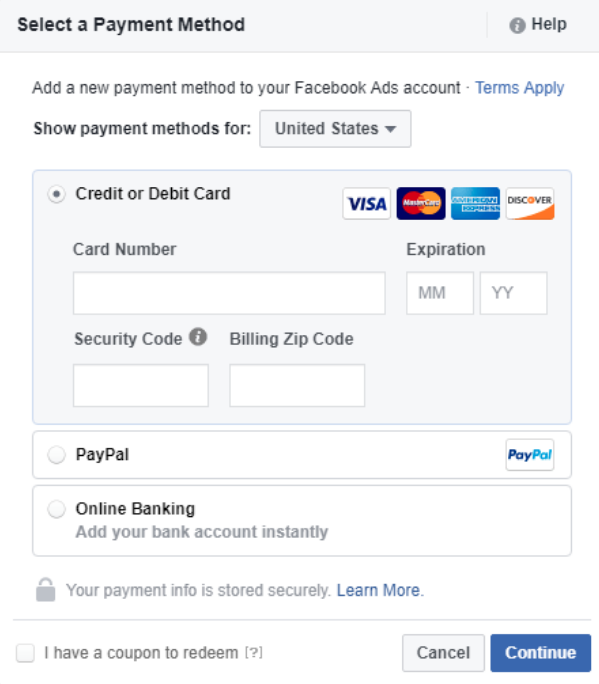
6. Select a payment option

Facebook is open to all the payment types you might expect. All you need to do is fill out your details (that is if they aren’t already saved in Facebook).


7. Boost

It's all set, and you’re ready to boost! Facebook does review all boosted posts, so it may take a while before you see yours published. You can check the status of your boosted posts at any time by looking at the Delivery column of your Ads Manager.

Boosting your posts helps you save time, while you reach out to a larger audience.
  • Share This:  
  •  Facebook
  •  Twitter
  •  Google+
  •  Stumble
  •  Digg
Email ThisBlogThis!Share to XShare to Facebook
Newer Post Older Post Home

0 comments:

Post a Comment

Blog Archive

  • ►  2019 (30)
    • ►  January (30)
  • ▼  2018 (8737)
    • ►  December (14)
    • ►  November (568)
    • ►  October (269)
    • ▼  September (922)
      • How to Change Birthday Settings on Facebook
      • How to Create a Closed Group on Facebook
      • Link Account Instagram
      • Unfriend Someone on Facebook Without them knowing
      • How Do You Know if Facebook Blocked You
      • I Forgot my Facebook Password - What Can I Do
      • FB Login Old
      • Event Notifications Facebook
      • Who Viewed my Profile
      • Messenger App Download Facebook
      • How to Remove Birthday in Facebook
      • Facebook Headquarters Contact Number
      • Edit Profile Picture Facebook Mobile
      • How to Make Memories on Facebook
      • How to Stop Facebook Notifications on Android Phone
      • Create Group Chat on Facebook
      • Link Instagram and Facebook
      • Unfriending on Facebook Etiquette
      • Who See my Facebook Profile not Friend
      • How Do I See who has Blocked me on Facebook
      • Forgot my Facebook Passcode
      • Facebook In to Login
      • Delete Facebook Account Now
      • Facebook Messenger Link for Android
      • Where Do I Find my Archived Messages on Messenger
      • How Do I Read Archived Messages on Facebook
      • How Do I Share my Memories on Facebook
      • Info Facebook Com Contact
      • How to Show my Birthday on Facebook
      • How to Make a Profile Picture
      • What are Notifications in Facebook
      • How to Join a Group in Facebook
      • How to Change Facebook Phone Number without loggin...
      • Reset Facebook Account
      • Link Instagram to Facebook
      • Unfriended Download
      • How to Know Who can See my Facebook Profile
      • People I Have Blocked
      • Download my Facebook Photos
      • If I Forgot my Facebook Password
      • How to Make Admin of a Facebook Page
      • Delete Instagram Photos
      • Facebook Delete Account
      • How Do I Create a New Facebook Page
      • How to Recover your Facebook Messages
      • Instagram Unfollowers App Free
      • How to Find Deleted Friend Requests on Facebook
      • Facebook Login Facebook Page
      • Completely Erase Facebook Account
      • How to Install Messenger on iPhone
      • How to Upload Animated gif on Facebook
      • How Can I Get Memories on Facebook
      • Facebook Administration Contact
      • How to Do a Facebook Graph Search
      • How to Put Birthday Images on Facebook
      • Facebook Profile Picture
      • Clear all Notifications Android
      • Deactivate my Facebook ID
      • Different Facebook Group Types
      • How Do U Logout of Messenger
      • Update Facebook
      • How to Link Instagram to a Facebook Page
      • How to Post your Location on Facebook
      • How to Switch off Location in iPhone
      • What Does Unfriending Mean
      • How to Know Who Views my FB profile
      • How Can I Deactivate Instagram Account
      • How to Facebook Stalk Someone who Blocked You
      • How Do You Reset Instagram
      • Facebook Mobile Poll
      • Pinterest Login Required
      • Facebook Photos Save
      • What to Do if you Forgot my Facebook Password
      • How to Add Admin on Facebook Business Page
      • Delete Instagram Photos from PC
      • Delete Messenger App
      • Deleting Facebook Accounts
      • How to See Who is Watching your Facebook Profile
      • Facebook Messenger Easy Download
      • How to Open Archived Chat in Messenger
      • New Facebook Account
      • Unfollowed me on Instagram
      • Download Instagram Photos
      • Reset Instagram Password
      • Post gif to Facebook
      • Memories of Today
      • Start a New Facebook Account
      • Contact Facebook UK via Email
      • Until my Birthday App
      • Facebook Video Profile Picture
      • How to Delete your Notifications on Facebook
      • Deactivate Facebook Account from Mobile
      • Who Unfollowed me on Instagram Unfollowgram
      • Can you Download Instagram Photos
      • Find Cell Phone Numbers by Name
      • Can you Recover Facebook Messenger Messages
      • How to Get Followers on Facebook
      • How to See Friend Requests on Facebook
      • Facebook Login Home Page Full Site
      • Delete Facebook Account from mobile Phone
    • ►  August (1873)
    • ►  July (266)
    • ►  June (192)
    • ►  May (1544)
    • ►  April (1335)
    • ►  March (1115)
    • ►  February (639)

Copyright © Facebook Help Center