Facebook: is it time we all deleted our accounts? - The social media can be a great way of keeping people in touch today but at the same time it can be time-consuming and a cheap way of exhausting data.
With over a million active users per day, Facebook is undoubtedly the most active social media network today. Facebook has a way of hypnotizing its users thereby making them stay hooked and drawn to it. Like a user once said that to every successful student there is a deleted Facebook account.
Facebook can become addictive if not checked in time. As a student, Facebook might be taking or consuming valuable time unknowingly to you. The time that is supposed to be used for studying might be spent on social media like Facebook. So therefore if you are a student who has become addicted to Facebook, the delete Facebook feature might be ideal for you. If you don’t think you will use Facebook again, then I think you should make use of the delete Facebook feature. But if you are not sure you can deactivate it temporarily.
How to delete or deactivate a Facebook account – what’s the difference?
There are two different ways to get your Facebook account offline. The first is deactivating, which means:
You can reactivate your account whenever you want
People can’t see your Facebook Timeline, or search for you
Some information may remain visible (like messages you’ve sent)
Facebook saves your account info (like friends and interests) in case you reactivate
But deleting your account is a much more serious matter. If you delete your account:
Facebook delays deletion for a few days after the request is made. If you log in during the grace period, the deletion is cancelled
You can’t regain access to your Facebook account once it’s deleted
It can take up to 90 days for your data that’s stored in backup systems to be deleted. However, your info isn’t accessible on Facebook during this time
Some things aren’t stored in your account, like messages that you’ve sent to friends – these will remain active
Copies of some material (like log records) may remain in Facebook’s database, but are “disassociated from personal identifiers,” according to the company
Basically, deactivating is a way to cool off from Facebook for a while, while deleting is a permanent solution that you should think carefully about before choosing.
You should know that the delete Facebook feature is completely different from deactivating your account. So, therefore, you should think carefully before deleting your account permanently. When a Facebook account is deleted you can’t reactivate any of your data, you can’t regain access to your account once it is deleted. The delete Facebook feature is not just a tap away. There is actually a deletion process. It takes 90 days to complete the deletion process. If you log in during the deletion process the whole process is canceled and you will have to start the whole process again.
How to Delete Facebook Account
Deleting your Facebook account means you won’t be able to access that account again after the deletion process is complete. To permanently delete your Facebook account, follow these steps;
A page will appear, displaying delete my account and cancel, click on delete my account.
Reenter your password in the password box provided on the next page.
Type in the captcha code in the box provided. If you can’t make out the code, you can request for another code by clicking on the try another text or an audio captcha rather.
Click on the ok tab which will automatically submit your code.
Lastly, a pop-up page will appear, click on ok to permanently delete your account.
HOW TO DELETE AN OLD FACEBOOK ACCOUNT WITHOUT YOUR PASSWORD
How to Delete Your Old Facebook Account Completely On Your Facebook Application
How to Completely Delete Your Old Facebook Account On Your Browser
Click in the top right side of the account's profile
Click ''Report''
Click ''Recover or close this account'' then tap on continue
On the pop-up screen, you will be given options:
If you select ''Recover this account'', you'll be logged out of your current account and taken through steps to help recover the hacked account
If you select Close this account, the profile will be reviewed and deactivated after Facebook is able to verify that it's your old account.
Search terms: how to delete facebook account without password and email, how can i delete my old facebook account if i've forgotten the password, i want to delete my facebook account immediately, how do i delete my facebook account if i cant access it?, how do i delete my old facebook account, how to delete old facebook account without access, i have two facebook accounts how do i delete one, delete old facebook account create new one.
NOTE: Ensure that your current profile is not a friend to your old profile, i.e, on your current and new profile, you should not be friends with your former and old profile.
Note that when you delete your account you won’t be able to retrieve anything you have added to it. You won’t be able to reactivate your account once the deletion process is complete. Just in case you are having second thoughts or doubts you might want to download a copy of your data from Facebook before deletion of your account. When you delete your account other users won’t be able to see it. It takes up to 90 days from the beginning of the deletion process to completely delete all your data from Facebook.
How to take control over what you see on Facebook
If you're not happy with what you're getting from Facebook, there are lots of ways to tweak the experience without pulling the plug completely. In a moment we'll cover how to turn your account into a super-private, locked-down one, but first there are steps you can take to control the content you see.
Next to every item on your News Feed you'll see a drop-down menu: Click on this to hide the post (and others like it) from your feed in future.
Choose News Feed Preferences from the drop-down menu on the Facebook toolbar on the web and you get a whole host of extra options too. You can prioritize the people you see in the News Feed, unfollow people you're bored of, and find more interesting Pages you might want to subscribe to.
Custom friends lists are great for cutting down on News Feed clutter. Click Friends Lists on the left of the News Feed and you can create a subgroup from your contacts. Each list will have its own custom URL that will work as an alternative to the main News Feed.
Facebook also offers a bunch of options for making your profile a much more private affair (if you ever want to see how your profile looks to someone else, click the dotted button on your profile's cover photo and choose View As).
Every time you post something on Facebook, whether it's a photo or a status update, from mobile or the web, you'll see an audience selector drop-down menu—you can add or remove any of your contacts to the "audience" for the post, and your choices are remembered for next time.
Any of your friends lists (see above) can be chosen too, so if you wanted, only a small group of your buddies would ever see anything you did on Facebook... though of course there's nothing to stop other people uploading embarrassing pictures of you.
Head to the Privacy section of Facebook Settings and you can stop people from tagging you on Facebook, hide your profile page from search engines on the web, and more. You can also make it impossible for potential contacts to look you up based on your phone number or email address, which should be enough to keep those old school friends you never want to see again at bay.
If your beef with Facebook is intrusive advertising and tracking then there are ways to limit this as well, though you do give up some level of privacy by signing up for the site in the first place.
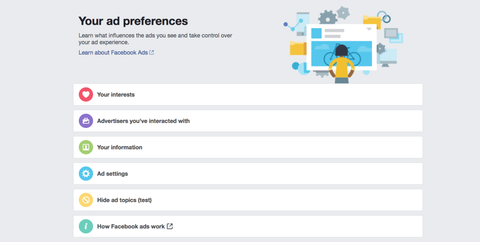
From Facebook Settings click Ads and you can stop your Facebook ad preferences following you around the web, stop Facebook targeting ads at you based on some aspects of your online activity, and even tweak the topics Facebook thinks you're interested in (the ones that it uses to serve up ads).
For even more protection against online tracking, head to the Digital Alliance website and opt out as many tracking programs as you like. There are also browser extensions that can help protect your privacy, both on Facebook and off: check out The Privacy Badger or Adblock Plus for Chrome and Firefox, for example (just please remember to add this blog to the whitelist along the way).



 in the top right side of the account's profile


0 comments:
Post a Comment