• Facebook Help Center

How to make your Facebook private

 Facebook, Make Facebook private     No comments   

Facebook is a wonderful tool you can use in keeping in touch with old friends, family and anyone else you care to talk to. But that digital freedom comes at a cost: your privacy. Fortunately there are ways to make sure that only the people you want to see your Facebook profile can – unless of course somebody knows your password.
The steps to making your Facebook private is actually relatively easy once you familiarize yourself with the increasingly bloated user-interface. So where do you begin? Read on.

1. Privacy Shortcuts
There are two easy ways to get to the necessary privacy settings of your Facebook profile. In the top right, you will see a button to the right of your name – it has a padlock sign on it and three horizontal lines. Press it and then select 'See More Settings' at the bottom.
How to make your Facebook private
On the other hand, you can click the little cog settings button located in the very top right next to the aforementioned Privacy Short button and then select "Settings" from the drop-down menu. The end result is exactly the same in either case. Now you can set your privacy to your standard.

2. Who can see my stuff?
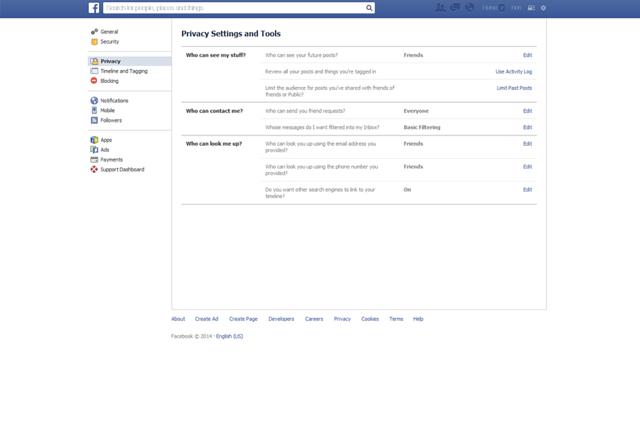
Under the Privacy Settings and Tools heading you will see three questions in bold letters: "Who can see my stuff?", "Who can contact me?" and "Who can look me up?". Let's start with the first heading on the list.
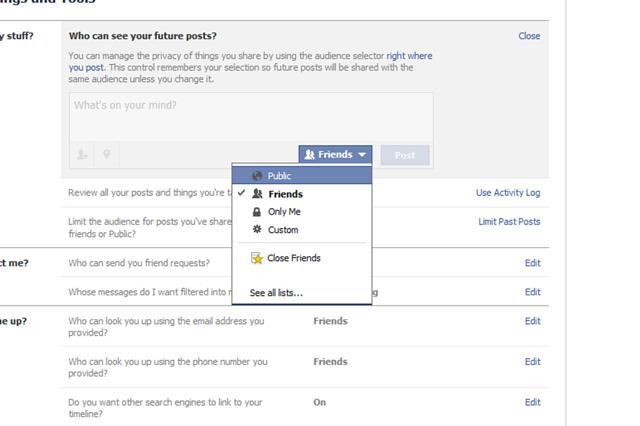
i) "Who can see your future posts?": click the edit button on the far right. Select who you want to see your future Facebook posts from the drop-down menu. Naturally, public will be the opposite of private so set it to "friends" if you only want Facebook friends to see them.
How to make your Facebook private
Also you can select "only me" if you want only yourself to see what you post, or click "Custom". Custom allows you to select specific options including "Don't share with", meaning you can choose a particular Facebook friend or friends you no longer wish to share posts with. You can also block lists you are a part of, such as a school network.
If there is a post you want to limit the visibility of, the "Review all your posts and things you're tagged in" setting located below allows you to do just that. Hit the "activity log" button and use the pen edit button to delete specific entries you no longer wish to share.

ii) Who can contact me?
If you want to stop getting messages in your inbox from people who aren't your Facebook friends, you can use the message-filtering option under "Who can contact me?". Switch it from basic filtering to strict filtering to only see messages from friends in your inbox. Doing so will keep random messages from strangers at bay.

iii) Who can look me up?
Maybe you want to limit who can look up your Facebook profile. The "Who can look me up?" options allows you to set your privacy to your preference in this regard. With friends enabled, only your friends can look you up using your email address.
The same options can be said for your phone number i.e., if you entered one into Facebook. Again, you can select the friends option for the highest level of privacy.

Finally, you can choose whether search engines such as Bing and Google can be linked to your Timeline. A simple tick box option is all it will take to really shut your Facebook profile off from the world wide web. As Facebook states, this option can take a while to come into effect so don't panic if it seems like you are still coming up on search engines.

Do you want ultimate privacy?
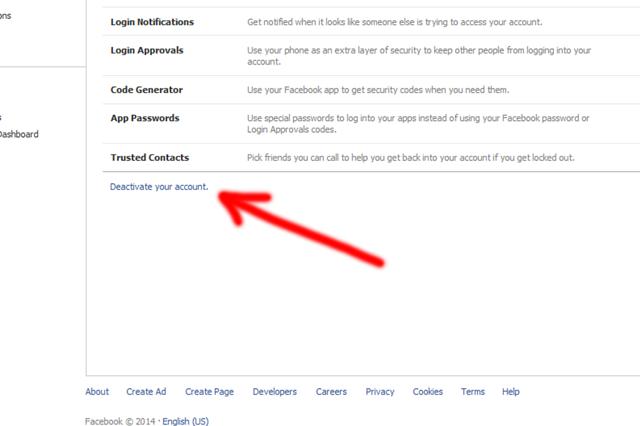
To really ensure your privacy, there is always the option of leaving Facebook entirely. Of course, this is a drastic course of action but something like online bullying could force your hand (in which case, you should seek support). Or maybe you are just tired of sharing everything so publicly.
How to make your Facebook private
  • Share This:  
  •  Facebook
  •  Twitter
  •  Google+
  •  Stumble
  •  Digg
Email ThisBlogThis!Share to XShare to Facebook
Newer Post Older Post Home

0 comments:

Post a Comment

Blog Archive

  • ►  2019 (30)
    • ►  January (30)
  • ▼  2018 (8737)
    • ►  December (14)
    • ►  November (568)
    • ►  October (269)
    • ►  September (922)
    • ►  August (1873)
    • ►  July (266)
    • ►  June (192)
    • ▼  May (1544)
      • Change your password- secure your account now!
      • How To Find My Archived Messages On Facebook Messe...
      • How to change My relationship status on Facebook
      • How to Hide My Photos on Facebook | Hide Facebook ...
      • Go Live on Facebook | Step by Step Guide On Facebo...
      • Deactivate Facebook Account _ Delete My Account
      • Open New Facebook Account | Create Account On Face...
      • How To View My Blocked List On Facebook | Facebook...
      • Delete Facebook Account Right Now | Facebook Delet...
      • Facebook Tag List | How to tag People or Pages in ...
      • How to turn off My Facebook Messenger Notifications
      • How to Open New Facebook Account using Chrome Browser
      • How To Delete A Post From My Facebook Timeline?
      • How to Delete Or Deactivate Your Facebook Account
      • How to change password on Facebook | Change Facebo...
      • How to Sync Facebook Contacts Android
      • How to Unblock Someone on Facebook | Unblocking Fa...
      • Facebook Login | FB Sign in Profile Account
      • How to Open New Facebook account on Chrome
      • Login Facebook - Facebook Login Account Online
      • Blocking And Unblocking Friends on Facebook Plus V...
      • How To Turn On Followers On Facebook Profile
      • How to Delete My Facebook Photo Album
      • Block Facebook Friend | How to Block a Friend On F...
      • Deactivate Facebook Account Temporarily
      • How to Hide My Facebook Friend List from Friends a...
      • How to Delete your Facebook account permanently Ri...
      • Change My Password | How Can I Change My Facebook ...
      • Close Facebook Account | How to Delete My Facebook...
      • Facebook Sign in - FB Account Login | How to Login...
      • Delete my account Permanently | Delete And Deactiv...
      • Unblock someone on Facebook | Unblock Friends And ...
      • How to Create A Facebook Group | Create New Group ...
      • How to Create Facebook Business Account - Create M...
      • How To Deactivate My Facebook Account On Mobile De...
      • How to Temporarily Deactivate Your Facebook Account
      • Deactivate Facebook Account Permanently Or Tempora...
      • How to Delete My Facebook Group | Delete Fb Group
      • How to Create New Facebook Profile Account
      • Reset My Facebook Password | How to Reset Password...
      • How Can I Change My Cover Photo on Facebook
      • Facebook Sign In New Account - Mobile Facebook Login
      • View My Blocked List On Facebook | See Your Facebo...
      • How to See Who Views My Facebook Profile | Who is ...
      • Download Facebook Messenger App and Login Facebook...
      • Facebook Stories Allows Users to View Who is Stalk...
      • How to change your last name on Facebook
      • What Does Facebook Poke Mean 2018
      • Download Facebook Messenger 2018
      • How can I deactivate My Facebook Account on Mobile...
      • How to Delete and Deactivate My Facebook Account Now
      • Deactivate Facebook Account Permanently Immediately
      • Login Facebook and Sign in Facebook Account
      • How to delete or deactivate My Facebook account te...
      • How to Delete Facebook Account Permanently
      • How to delete your Facebook Account Permanently on...
      • How to Deactivate and Delete Old Facebook Account
      • How To Delete A Facebook Page | Delete My Facebook...
      • How to Delete Your Facebook Permanently | Delete Y...
      • Block someone on Facebook Messenger | Blocking Peo...
      • How to change a password on Facebook Account
      • How to Unblock My blocked Facebook friends
      • How to secure your Facebook account | Change FB Pa...
      • Delete My Account Permanently Right Now On Facebook
      • Deactivate Facebook Account Temporarily With Pictures
      • Create A New Facebook Account | Sign Up For Facebo...
      • Where can I see a list of the people who like my P...
      • Download Facebook Lite App On Android - FB Free Apk
      • How Can I Logout of My Account On Facebook?
      • Facebook Login New Account - Mobile Sign In Facebook
      • How to Change My Password on Facebook | Change My ...
      • View Your Blocked Facebook List | How to See My Bl...
      • Close Facebook account temporarily and permanently
      • How to Block Someone on Messenger
      • How Do I Unblock a Blocked Facebook User - Step by...
      • Deactivate Your Facebook Account Tutorial
      • Where To View My Blocked List On Facebook | See Bl...
      • How to untag on Facebook Photo | Facebook tag remo...
      • How Do I turn off Facebook Messenger Notifications
      • Change My Last Name on Facebook | How to change yo...
      • How to Reset My Password on Facebook
      • Change My Birthday Date On Facebook
      • How to Go Live on Facebook | Facebook Live
      • How Can I unblock a blocked Facebook User Online?
      • How to Deactivate Your Facebook Account Temporarily
      • How and Where to View blocked list on Facebook
      • How Do I Change Cover Photo on Facebook | Changing...
      • Delete Facebook Account Link Permanently
      • How to deactivate your FB account in 10secs?
      • Login Facebook And How To Create New Facebook Acco...
      • See how to Block on Facebook
      • Delete Messenger Messages at once on Facebook | Fa...
      • View your block list | Facebook block list
      • How to Unblock Someone & My Facebook friends list ...
      • View Facebook Blocked List | How to See My Block L...
      • How you can delete FB account with no stress
      • See how to Deactivate your FB account with zero st...
      • How to deactivate or delete your account immediately
      • How to Open another Facebook account using Chrome
      • How to turn off Facebook messenger notifications
    • ►  April (1335)
    • ►  March (1115)
    • ►  February (639)

Copyright © Facebook Help Center